
AI Ghost Mannequin Generator
A retoucher takes ten to thirty minutes a garment to composite the inner back collar into the neck and mask the mannequin away. This AI ghost mannequin generator does the same job from your existing mannequin, hanger, flat lay or worn photo in about twenty seconds. The neck joint — the part that makes or breaks the effect — came back seated and correctly shadowed on every open-necked garment we tested. This page is also straight with you about the two frames that needed a second attempt, and why.
Start Creating FreeTry the AI Ghost Mannequin Generator — Free
Upload the apparel photo you already have — on a mannequin, on a dress form, on a hanger, laid flat or worn by a model — then pick the preset that matches what you shot. The quality of the upload decides almost everything: square-on to the garment, soft even light, plain light background, nothing cropped off at the edges. Then check the result against your original before it goes anywhere near a listing.
AI Ghost Mannequin Generator
Upload a mannequin, hanger, flat or worn apparel shot and get a hollow invisible-mannequin product photo at up to 4K
Upload your apparel photo, pick the preset that matches how it was shot, and click Generate
Six Garments, Nothing Retouched
These six came straight out of the model with no cropping, no cleanup and no compositing, across a deliberately awkward spread of materials: white on white, black on white, heavy cable knit, an open tailored jacket, a soft drape and a hood. The captions say what each frame gets right and what it took to get there. Four landed first time. Two needed a second attempt, and both reasons are worth knowing before you upload.
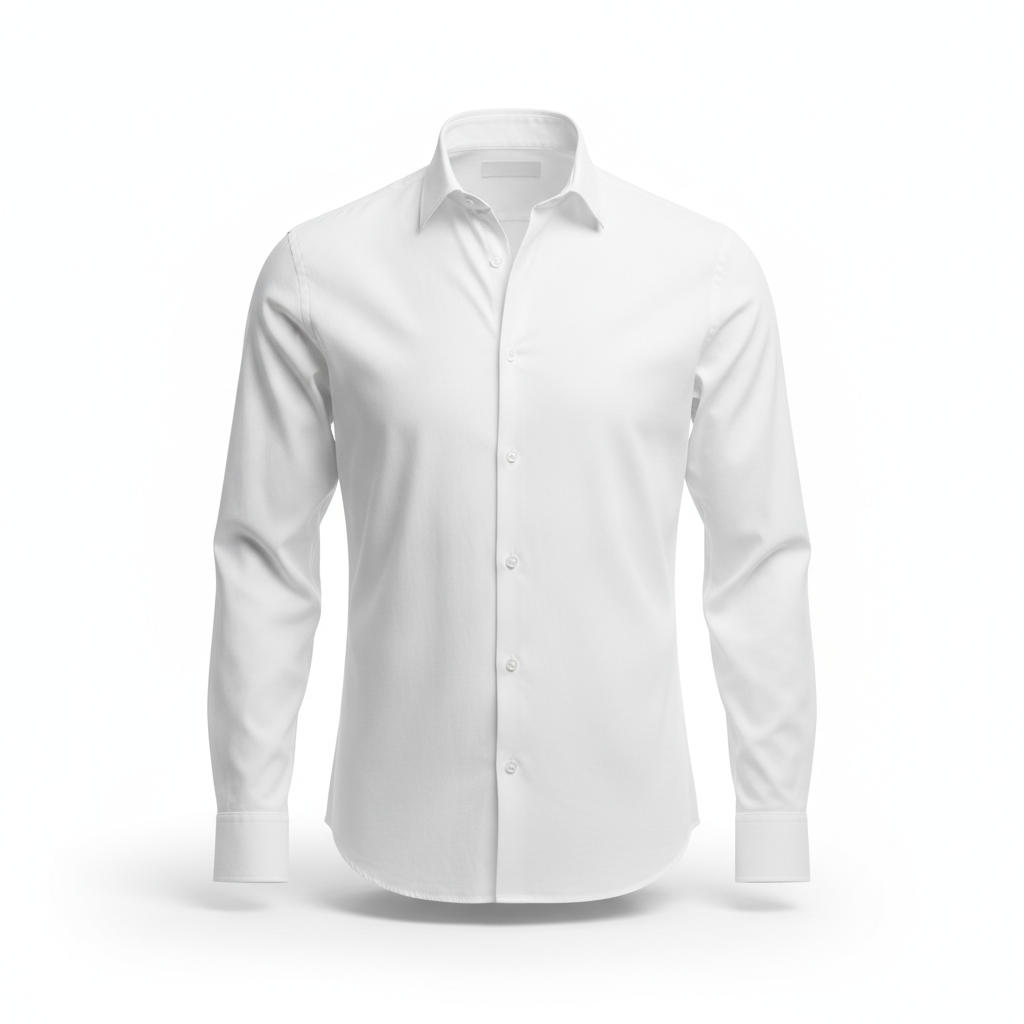
AI ghost mannequin generator result: a crisp white cotton button-down shirt filling a full three-dimensional torso shape on a pure white background, hollow and empty inside with the inner back of the collar visible through the open neck. This is the frame the whole effect is judged on and it is close to perfect. The neck joint is the hard part — the small curved piece of inner back collar that has to sit behind the front collar to prove nobody is wearing the shirt — and it came back cleanly seated, correctly shadowed and at the right depth. White on white is the other trap, because the garment and the background are the same colour and a weak result dissolves into it, but the shoulder line, the placket and the cuffs all separate through soft tonal shading alone. The buttons stayed round, the cuffs kept their fold, and the contact shadow under the hem sits where a real one would.
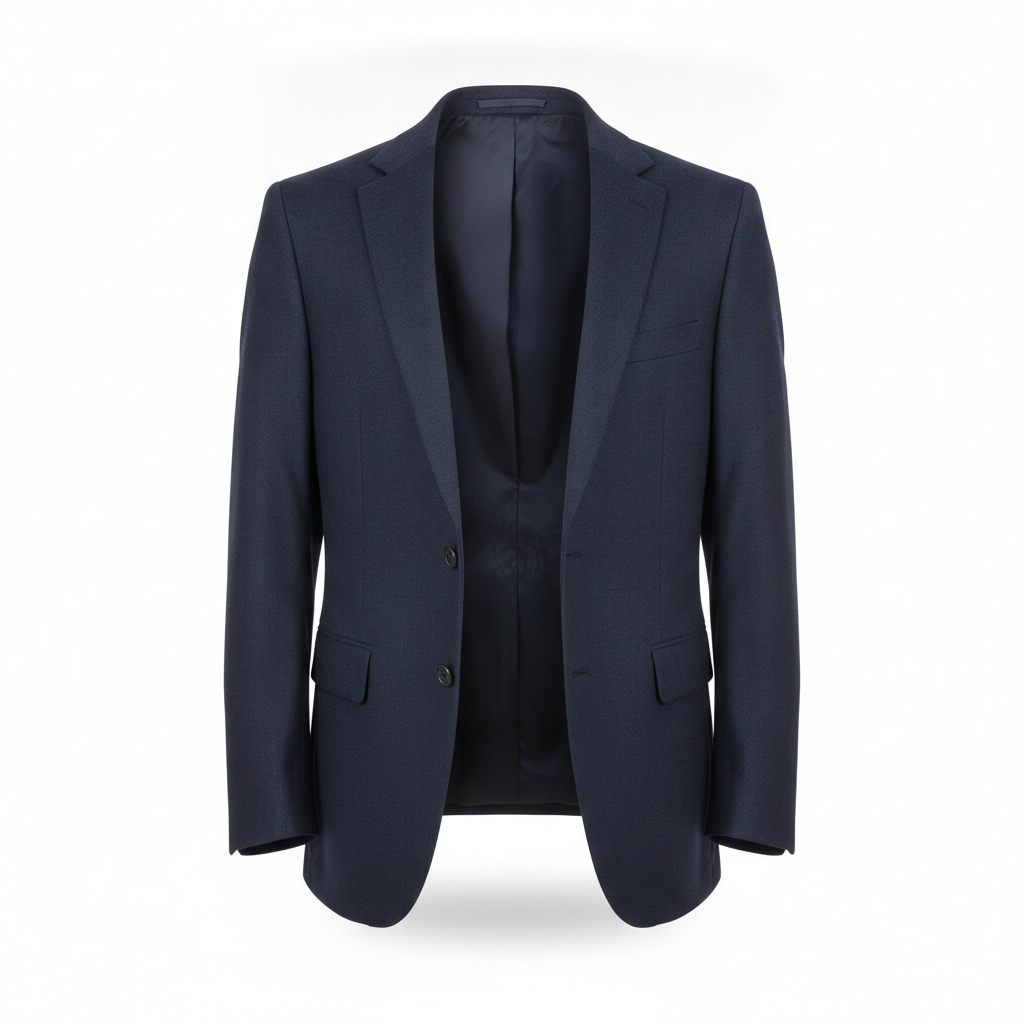
AI ghost mannequin generator result: a navy wool tailored blazer worn open, holding a filled shoulder and chest shape with the dark interior lining clearly visible down the open front and the inner back collar showing through the neck. This one took two attempts and the reason is worth knowing. The first run returned a technically flawless photograph of the back of the jacket — beautiful, sharp, and completely useless, because a ghost mannequin shot that does not show the neck opening does not demonstrate the effect at all. Adding the words straight-on FRONT view to the brief fixed it in one regeneration. What came back second is the hardest version of this shot to retouch by hand: an open jacket needs the inside of the garment rendered as well as the outside, and the lining, the interior seam and the shadow falling into the empty chest cavity all read correctly here.
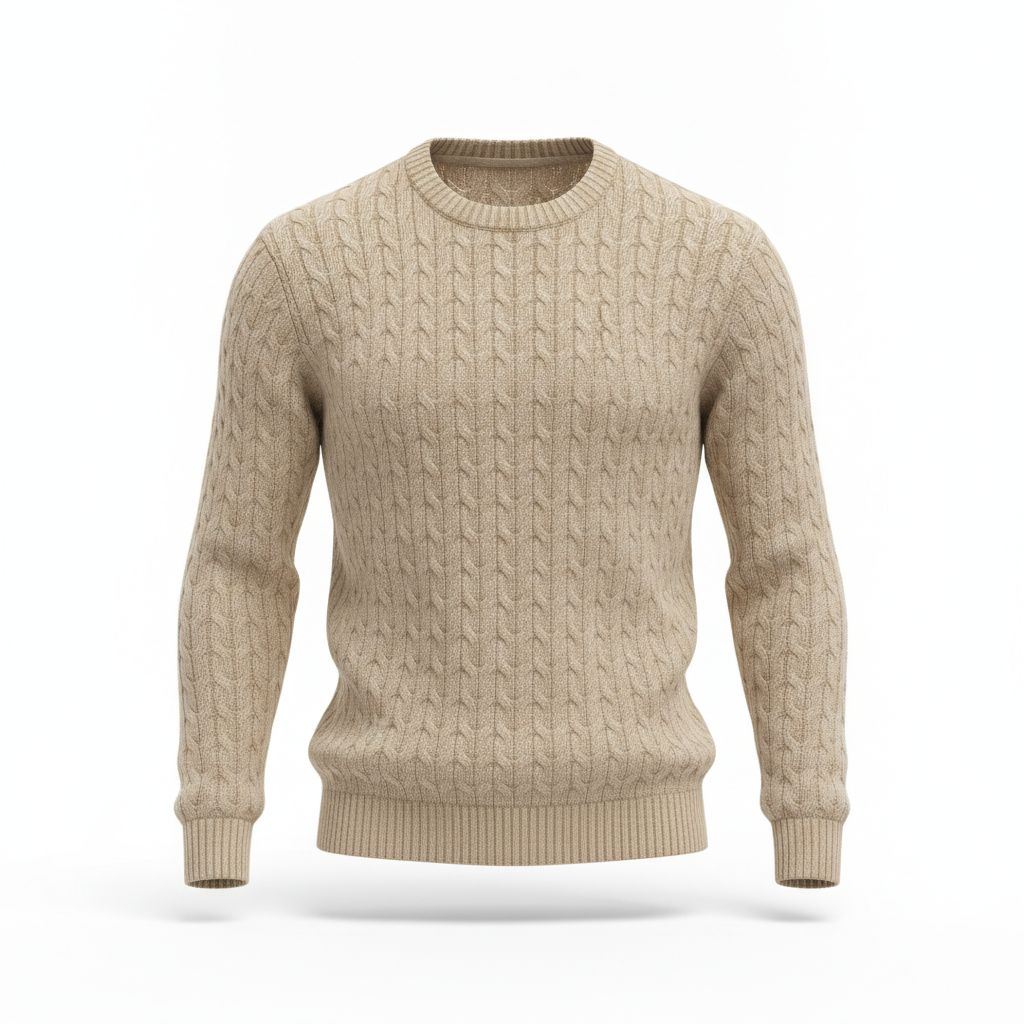
AI ghost mannequin generator result: a chunky beige cable-knit crewneck sweater holding a soft filled body shape on white, hollow through the ribbed collar with the inner back of the neckband visible. Knitwear is the material most likely to turn to mush, because cable knit is a repeating three-dimensional pattern and models love to smear repeating patterns into noise. It held. The cables run continuously over the shoulder and down the sleeve without breaking, splitting or doubling back, the ribbing at the cuffs and hem is genuinely ribbed rather than a printed stripe, and the wool reads as wool with a faint halo of fibre at the edges. The drape is the honest weak point: the sleeves hang slightly too straight and evenly for a heavy knit, which gives it a mild catalogue-render stiffness that a real garment on a real form would not have.
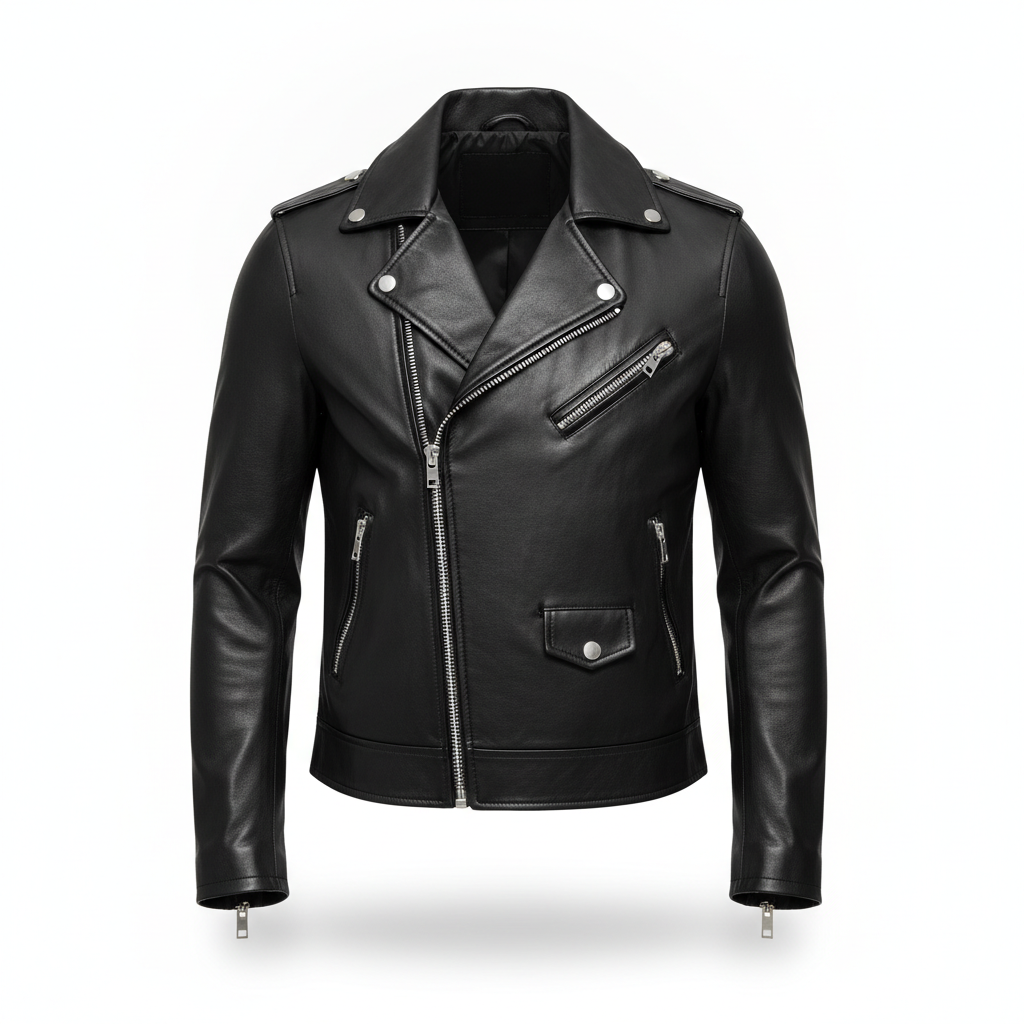
AI ghost mannequin generator result: a black leather biker jacket with silver zips, holding a full three-dimensional shape on pure white with the empty black interior clearly visible down the open asymmetric front and through the neck. Black on white is the opposite problem to the white shirt and arguably the harder one, because everything the eye reads as shape is a specular highlight, and if the model flattens those the jacket becomes a black silhouette. It did not. The sheen runs correctly along the sleeve rolls and around the shoulder, the lapels have believable thickness and stand away from the body, and the zip teeth stayed as teeth rather than dissolving into a grey line. Count the hardware before you use a frame like this: four zips, four pulls and the press studs all landed in the right places here, but hardware count is exactly the thing this model gets wrong when it does go wrong.
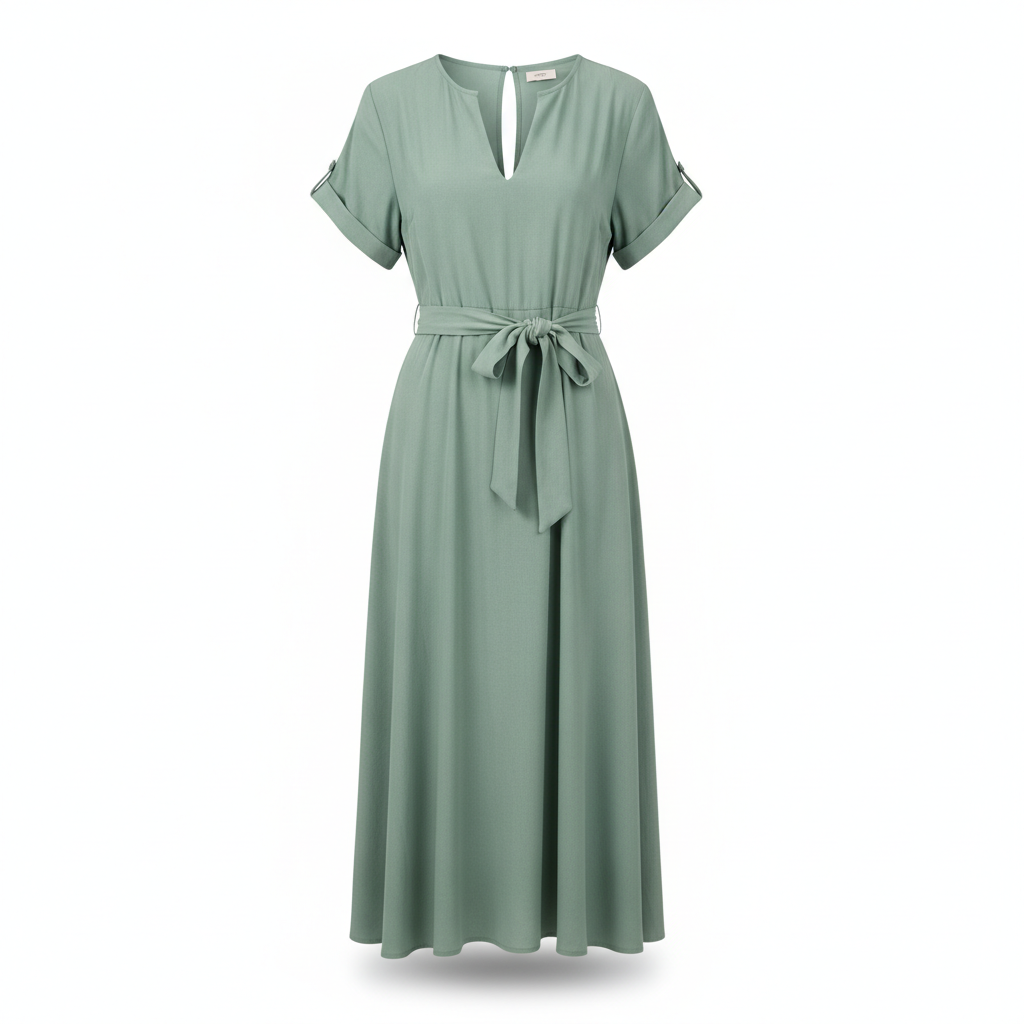
AI ghost mannequin generator result: a sage green midi dress with short sleeves and a tied fabric belt, holding a filled body shape on white with the empty split neckline showing the inner back of the collar. This is the second frame that needed a regeneration, and the reason was text. The first attempt was compositionally fine but it invented a small printed neck label inside the collar and dropped the background to a soft grey. Naming the failure explicitly in the brief — no printed neck label or care tag anywhere on the collar — cleared it, and the second run came back on clean white with the collar empty. The tied belt is the part worth studying: bows and knots are a classic generative failure, and this one has a coherent knot with the two tails falling in front of the skirt and casting their own shadow onto it.
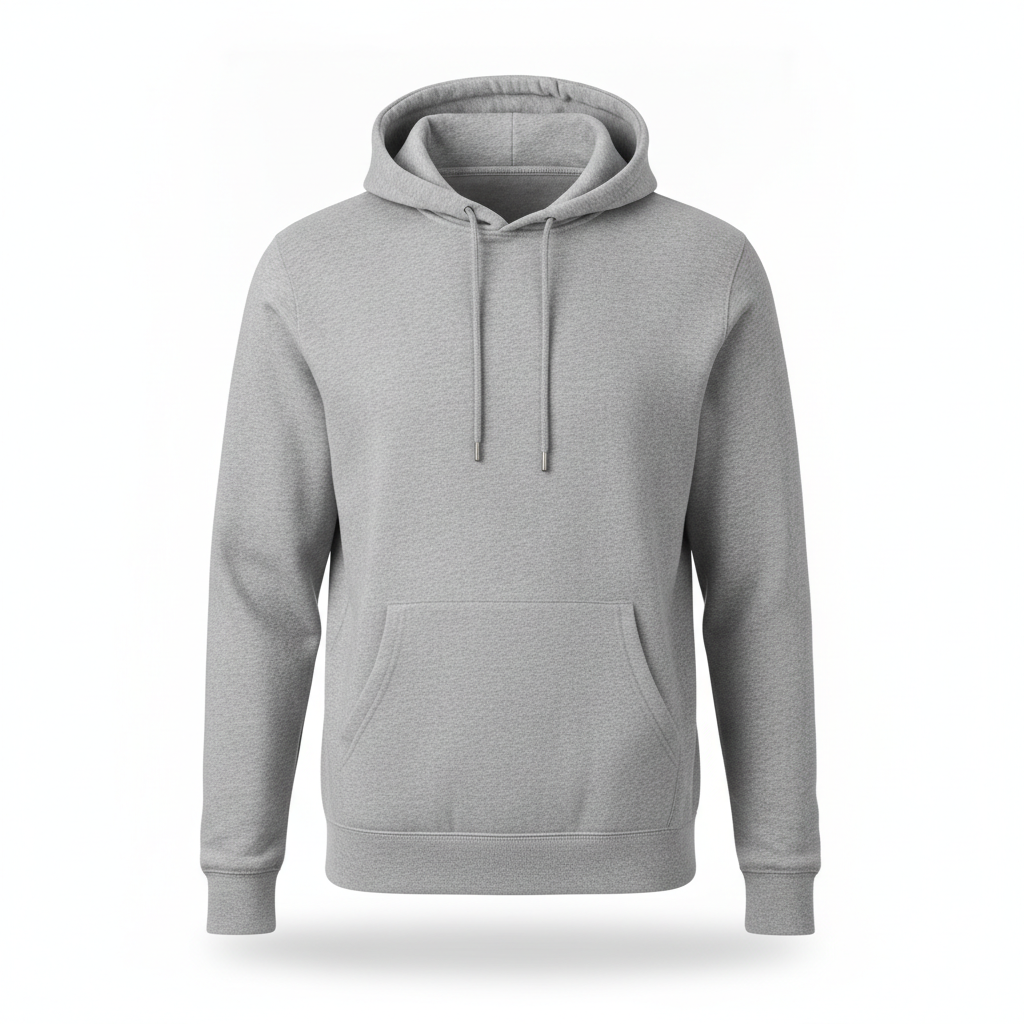
AI ghost mannequin generator result: a heather grey pullover hoodie with a kangaroo pocket and metal-tipped drawstrings, holding a full body shape on white. It is the most commercially convincing frame here and also the one that quietly dodges the hard part. A hood sits up and over the neck opening, so there is no visible neck joint to get wrong, which is exactly why hoodies look easy in ghost mannequin sets and why they are a poor test of whether a tool can actually do this. Everything else is strong: the marl of the heather fabric is a real fibre mix rather than added grain, the hood keeps its own hollow inner volume instead of collapsing flat, the drawstrings hang at slightly different lengths the way real ones do, and the pocket opening has a genuine dark recess. Note there is no brand on the chest, which is the correct default for an apparel template.
How the AI Ghost Mannequin Generator Works
Shoot the garment properly once
On a mannequin, a dress form or a hanger, square-on at chest height, plain light background, soft even frontal light with no hard shadow across the fabric, the whole item in frame with room at every edge, steamed and pinned so the front hangs straight. The single biggest quality lever on this page is the upload, not the preset.
Pick the preset that matches the shot
Mannequin removal, hanger removal, neck joint only, model removal, flat lay to 3D, or the marketplace white finish. They are six different jobs, not six looks — removing a person requires the model to invent far more than removing a hanger does, so the brief for each is written to a different problem.
Check it against the original at full size
Open your source photo and the result side by side. Count buttons, zips and pockets. Follow every stripe across every seam. Check the hem length, the collar shape and the colour under neutral white balance. Scan the neckline and cuffs for leftover skin or hair. Regenerate anything that changed. This pass is the job.
What This AI Ghost Mannequin Generator Nails, and What It Breaks
Every page in this series ends up naming the one thing renders drop. For apparel it is product identity — which is to say, the exact thing your customer is paying for and the exact thing a returns department argues about.
The neck joint is genuinely solved
This is the headline and it is the reason the tool is worth using. The inner back collar — composited behind the front collar at the right depth, in the right interior fabric, a stop or two darker, with a shadow falling into the cavity — is the detail a retoucher is actually being paid for, and it came back seated and clean on all four open-necked garments. No hard mask line, no halo, no double collar, no mannequin peeking through. That is the ten to thirty minutes a garment that this replaces.
It regenerates, so it can redraw your product
The one risk that matters. This is a generative model rebuilding your garment, not a masking tool cutting around it, and rebuilding means it can quietly change a button count, migrate a pocket, break a stripe across a seam, lengthen a hem or return a slightly different cut. Every individual result looks convincing, which is what makes it dangerous. Compare against the source at full size before anything goes live, and treat that check as part of the workflow rather than an optional extra.
Two of six needed a second attempt
The blazer came back as a technically flawless photograph of the back of the jacket, which shows no neck opening and therefore demonstrates nothing. The dress invented a small printed neck label and dropped the background to grey. Both were fixed in one regeneration by naming the failure in plain words — straight-on front view, and no printed neck label or care tag on the collar. Budget two or three attempts per garment rather than expecting one.
Difficult materials came through
The spread was chosen to be hostile. White cotton on a white background kept its shoulder line, placket and cuffs through tonal shading alone. Black leather on white kept its specular highlights instead of flattening to a silhouette, and the zip teeth stayed teeth. Cable knit kept its cables running unbroken over the shoulder and down the sleeve, which is the classic repeating-pattern failure. Wool, leather, knit, viscose and brushed fleece all read as themselves.
Hoods hide the hard part
The hoodie is the most commercially convincing frame on the page and it proves the least, because a hood sits over the neck opening and there is no joint to get wrong. This is worth knowing when you evaluate any ghost mannequin tool, including this one: a gallery full of hoodies and crew necks with high collars is a gallery that has quietly avoided the test. Judge on an open collar, an open jacket or a deep neckline.
The text ban held everywhere
Apparel is covered in text in real life — neck labels, care tags, swing tags, chest prints — and every preset here carries an explicit prohibition on all of it. Across the six frames there is not one letter, not one invented logo and not one printed label, after the dress was regenerated. That is the right default for a product template, because a garment carrying a misspelt brand name that is not yours is worse than no image at all.
Ghost Mannequin Photography in Numbers
The effect is a production line problem before it is a creative one. These are the constraints that decide whether automating it is worth it for your catalogue.
Two shots, one composite
The traditional method needs the garment photographed twice — once on the form and once with the neck section pulled through or the item turned inside out — then the interior composited into the neck opening by hand. That second shot is what an AI ghost mannequin generator removes from your shoot day.
Ten to thirty minutes a garment
That is the usual hand-retouching window for a clean invisible mannequin composite, longer for open jackets and anything patterned. On a two hundred piece drop it is a working week of somebody's time, which is why this is the first apparel retouching job most brands automate.
White is the marketplace default
Amazon requires a pure white main image with the product filling most of the frame, and hollow apparel shots on white are the house style across fashion retail. Square at 2000 pixels or more on the short side covers almost every platform, with headroom left to crop.
The photo is the promise
Apparel already carries the highest return rate in e-commerce, and a product photo that misrepresents a detail feeds straight into it. Generate the presentation freely. Never let a render change a cut, a colour, a closure or a count that a buyer is relying on.
Why Use This AI Ghost Mannequin Generator
The neck joint, done for you
The one detail that separates a professional invisible mannequin shot from a floating garment, composited at the right depth with the right interior fabric and a real shadow behind it, in about twenty seconds instead of the twenty minutes a retoucher would take.
Six presets, six different jobs
Mannequin removal, hanger removal, neck joint only, model removal, flat lay to 3D and the marketplace white finish. Each brief is written to its own problem, because rescuing a worn shot and cleaning up a hanger shot ask completely different things of the model.
One shot instead of two
The traditional workflow needs the garment photographed twice and composited by hand. Here you shoot it once on whatever form you own — mannequin, dress form or hanger — and the interior of the neck is built for you, which is a real saving on every shoot day.
Marketplace white built in
Pure flat white, the garment upright and square at about eighty-five percent frame fill, one soft contact shadow under the hem, nothing cropped at the edges. That is the Amazon main image spec and it is the preset rather than an afterthought.
Honest about what it cannot do
This page publishes the misses: a jacket returned back-first, a dress that invented a neck label, and the standing risk that a generative model redraws the product it is rebuilding. You should know all of that before your catalogue goes live, not after a customer does.
Cheap enough for a whole drop
About twenty seconds a garment and plans from $2.99 means a two hundred piece range stops being a retouching budget line. Free to start, square by default, and up to 4K so there is room to crop for every channel you sell on.
AI Ghost Mannequin Generator FAQ
Related Apparel & Product Photo Tools
AI Virtual Try-On
The opposite operation. That page puts your garment onto a person, this one takes the person out and leaves the garment holding its own shape. Most apparel listings want both: a worn shot for desire and a hollow shot for detail.
AI Amazon Listing Image Generator
Where a finished ghost mannequin shot usually ends up. Pure white, eighty-five percent frame fill, no props, plus the infographic and lifestyle slots that sit behind the main image on a listing.
AI Product Photo Generator
The general purpose version for everything that is not clothing. Reach for it when the product has no neck opening to composite and you simply need it lit and placed on a clean background.
Empty the Mannequin
Six apparel presets: mannequin removal, hanger removal, a neck joint rebuild, model removal, flat lay to three dimensions, and a marketplace white finish at eighty-five percent frame fill. All from the photo you already have, all in about twenty seconds, all up to 4K. Free to start, from $2.99 for more.
Start Creating FreeAn AI Ghost Mannequin Generator for Apparel E-Commerce
The ghost mannequin effect is the quiet standard of online clothing retail. Scroll any fashion category on any marketplace and most of what you see is a garment holding a full human shape with nobody inside it, floating on white, with a small curve of inner collar visible through the neck. It is the standard because it works: it shows the cut and the fit the way a flat lay cannot, it shows the fabric and the finish the way a model shot does not, and it does it without a face pulling attention away from the product. What has always made it expensive is that it is two photographs and a manual composite. This AI ghost mannequin generator turns it into one upload, and the part it handles best is exactly the part that costs the most: the neck joint.
The presets on this page are written as six separate jobs rather than six filters. Mannequin removal erases the form, the base and the shoulder caps and rebuilds the interior of the neck. Hanger removal has a harder structural task, because a hanger creates pointed shoulders and flat, creased sleeves that have to be rebuilt into natural human volume. The neck joint preset does nothing but the composite, for photos that are already clean everywhere else. Model to ghost removes a person entirely, which means inventing everything the body was hiding and checking for the leftovers — a strand of hair, a sliver of skin at the cuff, an elbow bend in a sleeve with no arm in it. Flat lay to 3D lifts a garment off the table and stands it up. Marketplace white is the finishing pass that puts the result on pure flat white at the frame fill Amazon asks for.
The six frames in the gallery were generated across a deliberately hostile spread of materials, because this is where apparel tools usually fall apart: white cotton against a white background, black leather that has to hold its highlights, a heavy cable knit whose repeating pattern invites smearing, an open tailored jacket that needs its interior rendered as well as its exterior, a soft viscose drape with a tied belt, and a hood. Four landed on the first attempt. The blazer needed the words straight-on front view added after it returned a beautiful and useless photograph of the back of the jacket. The dress needed an explicit ban on neck labels after it invented one. Both fixes took one regeneration, and both are the kind of thing you only learn by publishing what actually happened rather than only the frames that worked.
The limit to keep in mind is structural rather than cosmetic. This is a generative model rebuilding your garment, not a masking tool cutting around it, so a button count can change, a pocket can migrate, a stripe can stop meeting across a seam and a hem can gain a centimetre — all inside a result that looks entirely convincing on its own. Apparel already carries the highest return rate in e-commerce, and a photo that quietly misrepresents a detail feeds straight into that. So use an AI ghost mannequin generator for what it is genuinely excellent at, which is presentation, volume and the neck joint, and keep one habit non-negotiable: open the source photo next to the result at full size, check the details a customer is paying for, and regenerate anything that moved. The garment in the picture has to be the garment in the parcel.