
AI Cutting Board Design Generator
A cutting board looks like the simplest object in the kitchen and is quietly one of the most over-determined. Which way the grain faces decides how it survives a knife. Which species you pick decides both the food safety and how any engraving reads. And the groove, the feet and the handle are routing passes committed to long before anyone sands it. This AI cutting board design generator settles the look properly and is straight with you about the four numbers no image can carry.
Start Designing FreeTry the Cutting Board Design Generator — Free
Choose the construction first, then name the species, the edge treatment and the decoration. Every preset is written as real woodworking product photography on a plain ground, because a board concept you cannot photograph is a board concept nobody can put on a listing.
AI Cutting Board Design Generator
Pick a construction, describe the wood, the edge and the decoration, and get board product shots at up to 4K
Boards Designed With This Generator
Five of these came from the presets above, unedited, flaws included. The third is not a product shot at all — it is a comparison row of five identical boards in five species carrying one identical engraved motif, built to answer the question this category keeps getting wrong. Two of the others are worth pointing at as warnings. The live-edge slab turned a small fissure into a resin vein running clean through both ends, which is a split rather than a blemish. The round paddle came back as one uninterrupted piece of cherry with no glue lines, and a solid round that wide will cup. Read these renders for grain, species and how decoration sits on wood, and treat every construction detail as a question for whoever is going to cut it.
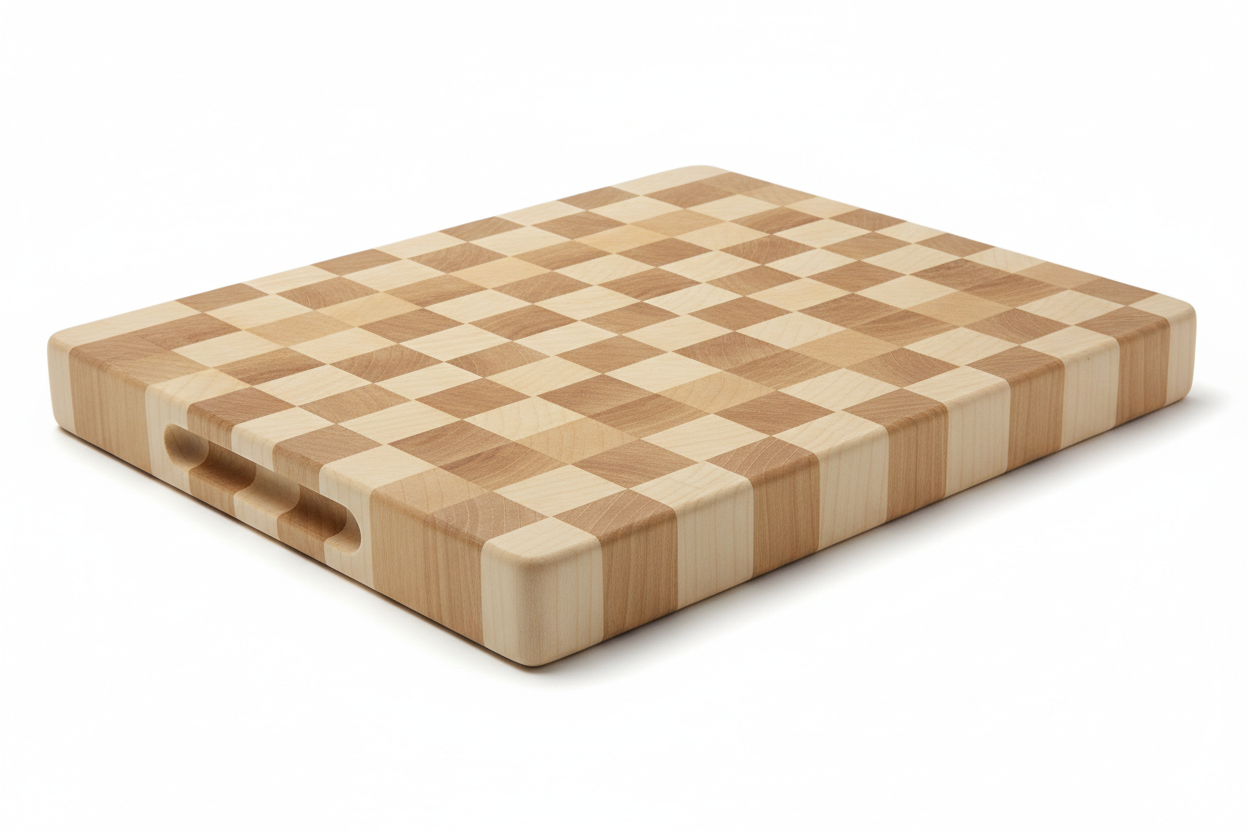
AI cutting board design generator result: an unbranded end-grain hard maple butcher block about two inches thick, the top face a clean checkerboard of alternating cream and honey squares with long-grain stripes running down the sides, which is exactly right — the sides of a real end-grain block do show long grain. Two things are worth noticing. The finger grips landed as shallow slots in the long front face rather than proper handholds in the short sides, and the end-grain squares render as flat blocks of colour with none of the open pore texture that cut fibre ends actually have. The model knows the pattern; it does not know why the pattern is there
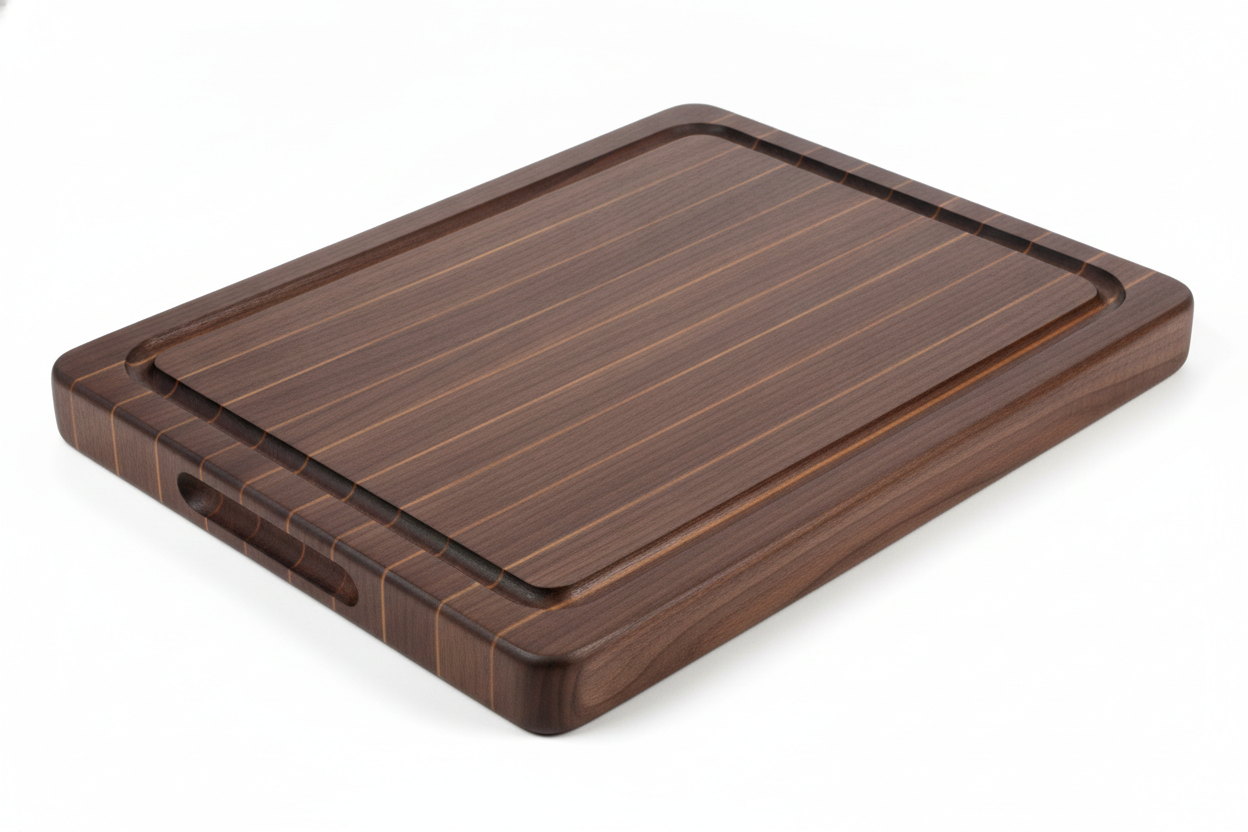
An edge-grain black walnut board with a juice groove routed as a continuous rounded rectangle inside the perimeter, which reads convincingly as a recess with a real radius at the corners. The tell is the glue lines: they arrive as pale orange pinstripes evenly spaced across the face, where a real walnut glue-up has seams you have to look for. The model has drawn lamination as a decorative stripe rather than as a joint. It also added a handhold slot that the prompt never asked for, which is the usual habit of filling in whatever a category normally has
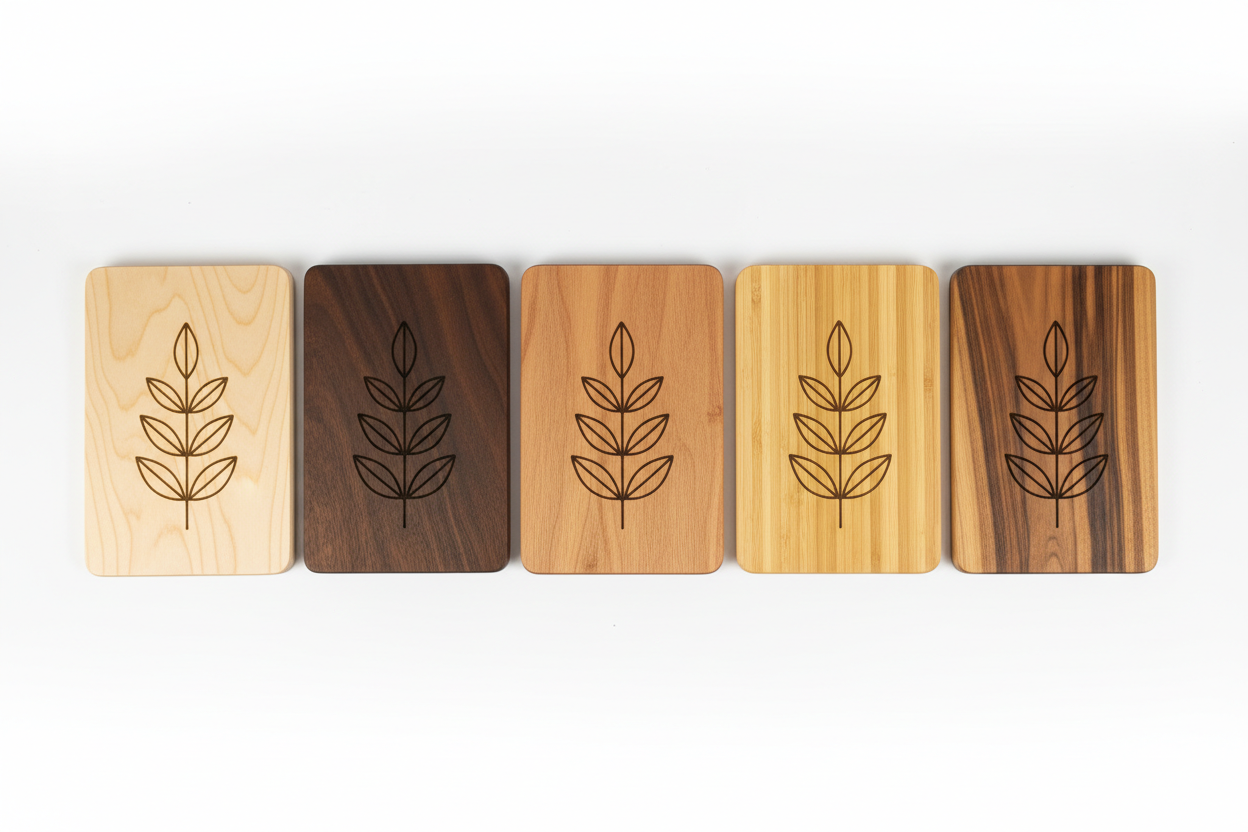
The comparison row, and the most useful frame on the page: five identical boards in hard maple, black walnut, cherry, bamboo and acacia, each carrying the same engraved leaf motif. One variable, five outcomes. The motif is crisp on maple, cherry and bamboo, it sinks into the walnut, and on the streaky acacia at the right the grain cuts straight through it. If anything the render flatters the walnut — a real burn on a wood that dark is fainter still. That single image decides more about a personalised board than the artwork does
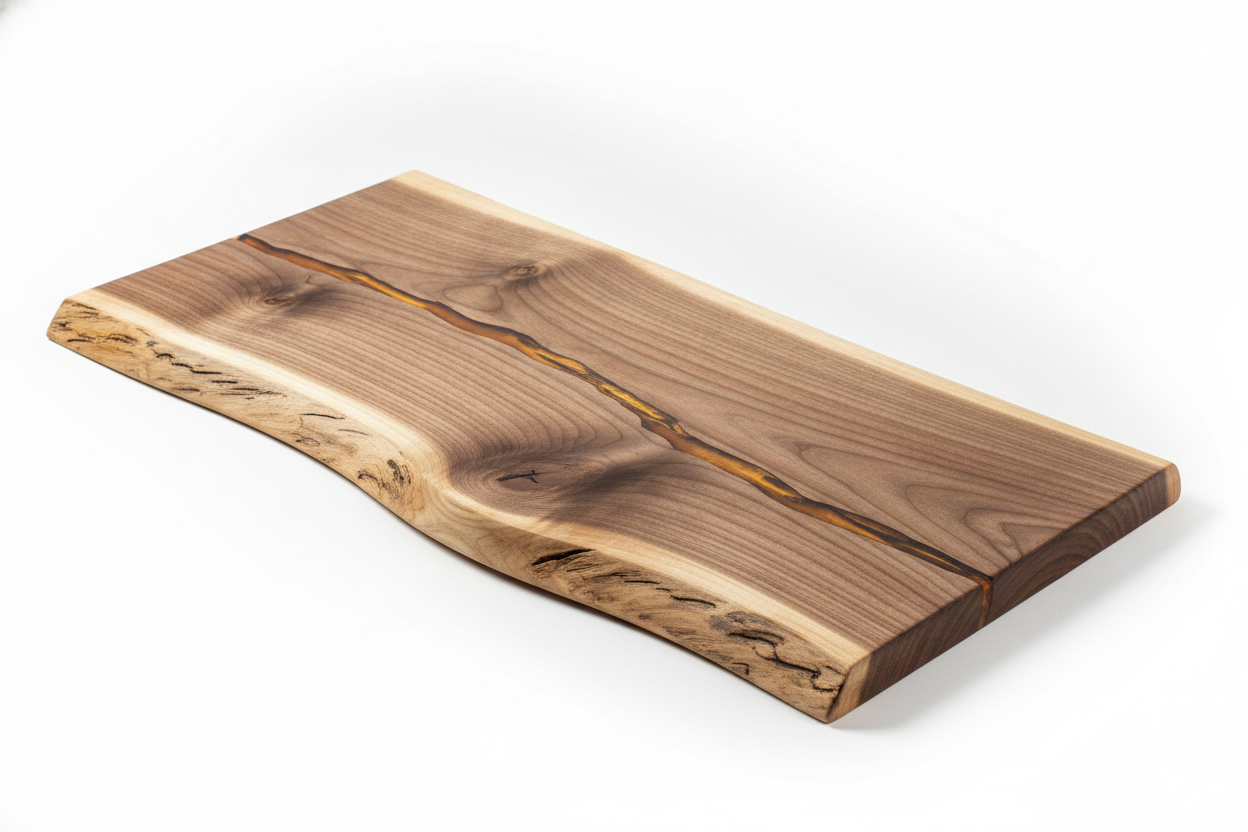
A live-edge walnut serving slab with one undulating natural edge and pale sapwood along it, straight cut on the far side, with beautifully resolved figure and a hand-rubbed satin sheen. The resin fill is the honest problem: the prompt asked for a narrow fissure through the middle and the render returned an amber vein that runs the entire length and exits at both ends, which is not a filled blemish but a through-crack. Pouring that in reality means damming both ends and accepting that the slab is in two halves held together by epoxy
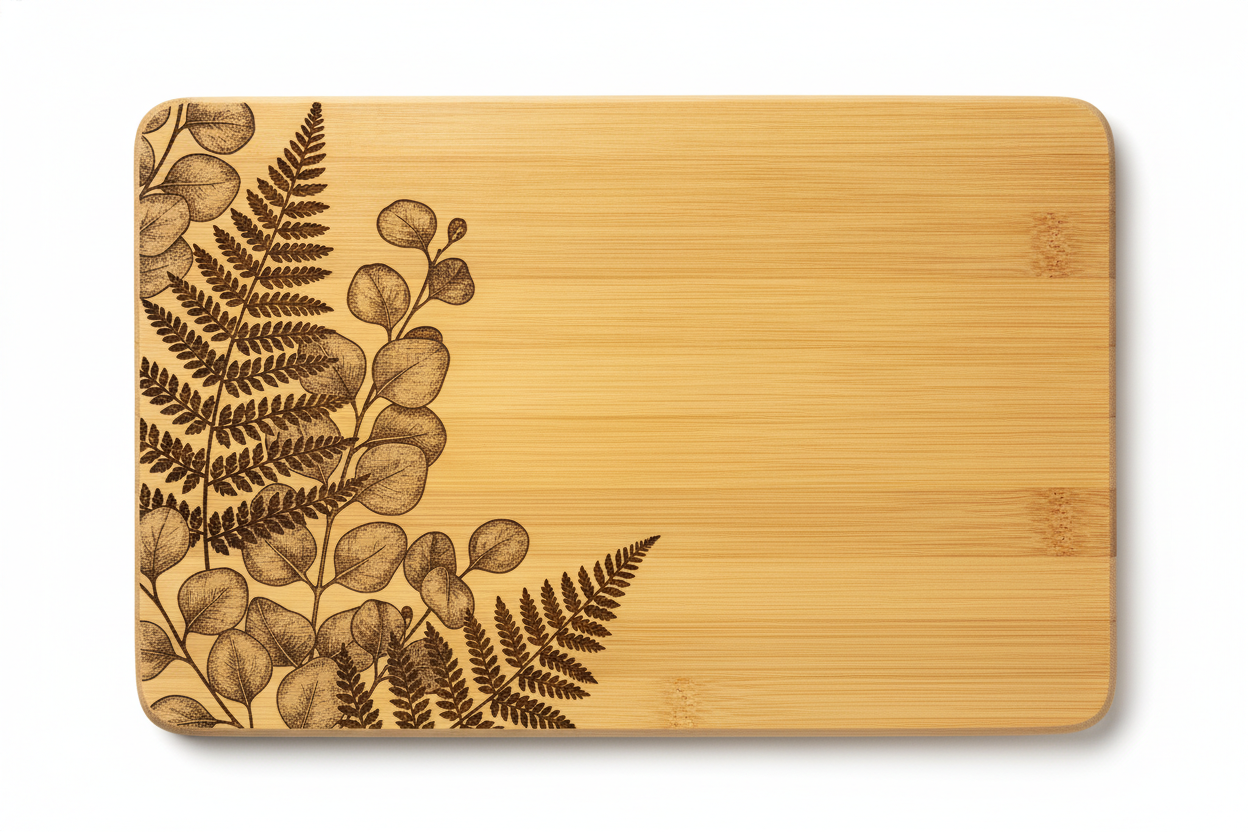
The commercially strongest frame of the six: a bamboo board shot flat from overhead with an engraved fern and eucalyptus motif filling the left third. Look closely at the eucalyptus leaves and the shading is dotted rather than continuous, which is precisely what a laser halftone looks like, because a burn has one tone and every intermediate grey has to be dithered out of it. The pale strand lines and the darker node marks toward the right edge are the giveaway that this is pressed bamboo rather than a hardwood
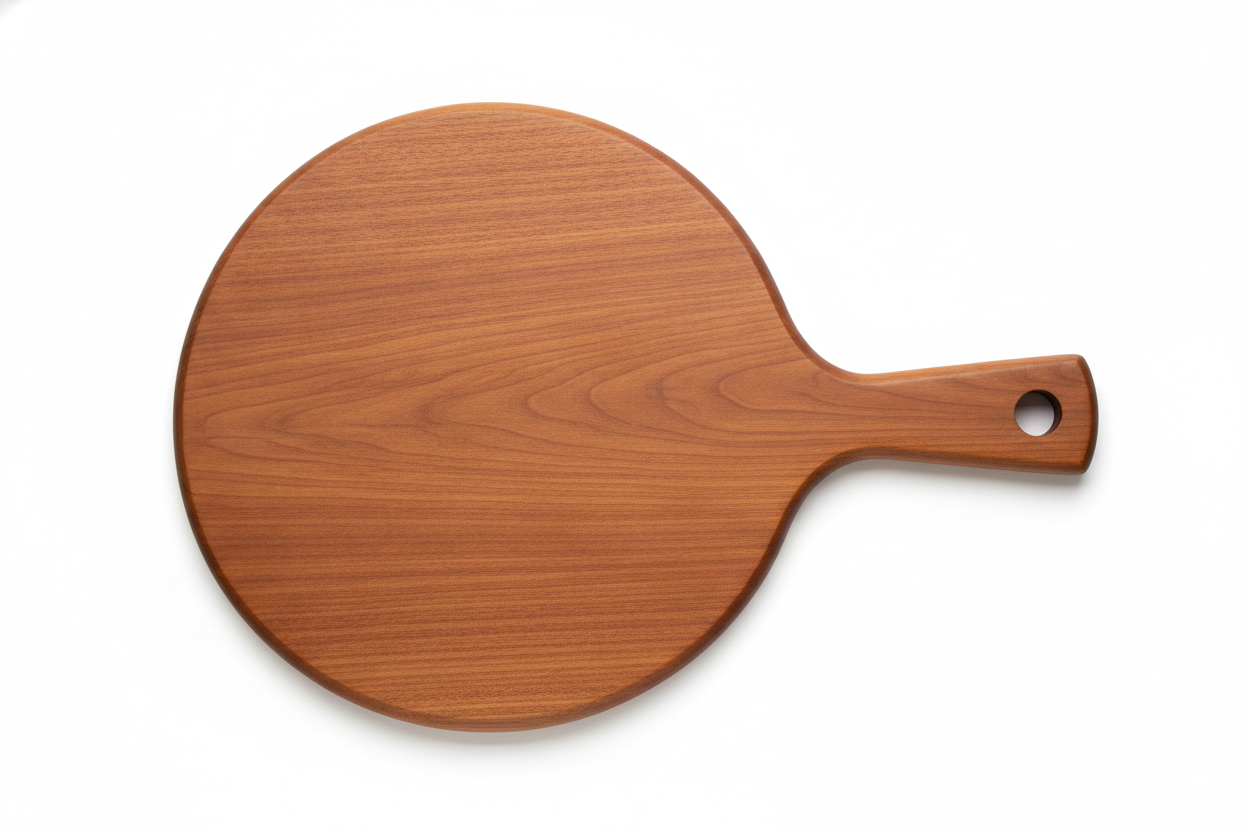
A round cherry paddle board with an integrated handle, a drilled hanging hole and a chamfer running the whole way around the top edge, rendered from directly overhead. What the picture quietly proposes is not buildable as drawn: the disc is one continuous piece of cherry with no glue lines anywhere, and a solid round that wide will cup and eventually split across the grain. Real paddle boards this size are glued up from several staves. The look is right, the construction is fiction, and that is the single most common way a wood render misleads
How the AI Cutting Board Design Generator Works
Pick the construction
End grain, edge grain with a juice groove, a live-edge slab, engraved bamboo, a round paddle or a chevron glue-up. That single choice sets the grain direction, the thickness the board has to be, roughly what it will cost to make and how it behaves under a knife — far more of the design than the species will.
Name the species, edge and decoration
Say maple or walnut or cherry, say chamfer or roundover or bevel, and say whether the face carries an engraved motif or an inlaid pattern. The model renders the grain that belongs to whichever wood you name, and grain is most of what makes a board look like a considered object rather than a plank.
Take the concept to a maker
Concepts arrive in about twenty seconds at up to 4K. The render settles what it looks like; a woodworker adds the four numbers it cannot hold — length, width, thickness and groove offset — and tells you what the glue-up will actually cost in that species.
What a Board Render Settles, and What It Hides
Six things decide whether a cutting board design works, and an image carries about half of them. Knowing which half is the difference between a concept a maker can quote and a picture of something that will not behave the way it looks.
Grain direction is the product
Stand the fibres on end and a knife slips between them, so the surface closes over shallow cuts and your edge stays sharp for longer — that is a butcher block, and it has to be thick and heavy to hold together. Lay the strips on their sides and you get the ordinary edge-grain board: lighter, cheaper, perfectly good, and it shows every stroke. The render tells the two apart instantly. It does not tell you that one of them is several times the labour.
Species decides safety and contrast at once
Closed-grain hardwoods — maple, cherry, walnut, beech — have pores tight enough not to harbour moisture, which is why they are the standard. Open-pore oak and ash look the part and do not behave. The same choice separately governs how any engraving reads, because a burn is one tone and all the contrast comes from how pale the wood beneath it is.
Dimensions are invisible in a render
A cheese paddle and a carving board photographed alone on a plain ground are the same picture at different sizes, because nothing gives scale. Thickness hides just as well, and thickness is what decides whether an end-grain glue-up survives and whether a wide board cups in a dry kitchen. Set the numbers first and judge the proportions against them.
Engraving is a burn, not an ink
A laser scorches the surface to a single brown. There is no white, no colour and no gradient except by dithering, so a photographic engraving arrives as a halftone rather than a picture. Design for one tone on one background, and expect a motif that sings on maple to disappear on walnut.
Grooves, feet and handles are machining decisions
A juice groove is a routing pass taken before finishing, and it permanently costs you working surface. Feet, a hanging hole, a thumb bevel and a handle are all committed at the same moment and none of them can be added to a finished board. Generate the version with and the version without, then choose deliberately.
The finish is food contact, not decoration
Boards are oiled, not varnished: mineral oil and a beeswax paste that gets renewed, rather than a film that cracks and lifts. A render shows sheen and says nothing about what produced it, and it certainly cannot certify a resin fill for incidental food contact. Keep that half of the specification on paper beside the picture.
Why Use This AI Cutting Board Design Generator
Six constructions, not six stains
End grain, edge grain with a groove, live edge, engraved bamboo, a round paddle and a chevron glue-up differ in grain direction, thickness and machining all at once — so switching preset changes what the object is rather than what colour it happens to be.
Written as product photography
Every preset specifies a plain ground, a named camera angle and soft studio light, so concepts arrive looking like the listing photo they will eventually need instead of an illustration floating in a gradient.
Species named in every prompt
Hard maple, black walnut, cherry and pressed bamboo each render with the grain and colour that belong to them. That one detail is what makes a concept read as real timber rather than a brown rectangle.
Decoration judged before it is burned
The engraved presets are written so the motif sits on the wood the way a real burn does, which is how you discover that your artwork needs a paler species long before you pay a laser shop to find out for you.
Consistent across a range
Nano Banana Pro holds a described style across separate generations, so reusing one species and one edge treatment while changing only the construction gives a family of boards that reads as one collection rather than six unrelated products.
Cheap enough to try the whole range
About twenty seconds per concept and plans from $2.99 means testing a full board line costs less than the walnut for a single prototype, which is what makes the trying-things stage affordable at all.
AI Cutting Board Design Generator FAQ
Related Design Tools
AI Apron Design Generator
The other half of a kitchen gift set. Same buyer, same season, and a printed textile behaves nothing like an engraved hardwood — worth designing together.
AI Mug Design Generator
Housewares on a curved ceramic surface instead of a flat wooden one. Useful for keeping a kitchen range consistent across boards and drinkware.
AI Packaging Design Generator
What a heavy board ships inside. Worth doing at the same time, because a butcher block is one of the more awkward things to box well.
Design Your Cutting Board Now
Six board constructions, species that render with the right grain, engraving that behaves the way a burn behaves, and 4K product shots in about twenty seconds. Free to start, from $2.99 for more.
Start Designing FreeAbout This AI Cutting Board Design Generator
An AI cutting board design generator earns its place on a narrow and unusually well-defined part of the job. A board is a piece of timber with four decisions glued into it. The first is grain direction, which is not a look but a construction: fibres standing on end give you a butcher block that a knife parts rather than scars, and fibres lying on their sides give you the ordinary edge-grain board that most kitchens own. The second is species, which quietly governs both food safety and how any decoration will read. The third is machining — the groove, the feet, the handle, the hanging hole — all of which are committed before the board is ever sanded. The fourth is decoration, and that is where nearly every seller in this category competes, because the underlying blanks are frequently identical and only the engraved face is different. A render settles the first, second and fourth of those in about twenty seconds. It has nothing useful to say about the third beyond showing you what it would look like.
That is why the six presets here are constructions rather than wood stains. An end-grain butcher block, an edge-grain board with a routed juice groove, a live-edge walnut slab, an engraved bamboo board, a round cherry paddle and a chevron glue-up differ in grain direction, in the thickness they need to survive and in the machining they demand — which is a real design decision. Changing a board from cherry to walnut is a smaller one, though it matters more than most people expect. Each preset names its species explicitly, because the model renders the grain that belongs to whatever it is told about, and grain is most of what separates a board that reads as considered timber from one that reads as a brown rectangle. End grain shows the open pores of cut fibre ends. Edge grain runs in long parallel lines with visible glue seams. Bamboo is not wood at all but a pressed grass, and it shows the fine horizontal strand lines that give it away.
Decoration is where this cutting board design generator is most immediately useful and where the hardest constraint lives, so it is worth being blunt about it. Laser engraving is a burn, not an ink. The beam scorches the surface to a brown that lands in roughly the same place on every species, which means all of the contrast in the finished piece comes from how pale the wood underneath happens to be. On hard maple or bamboo a motif reads almost black. On black walnut the same file is brown on brown. On a heavily figured wood such as acacia the grain competes with the artwork and breaks the design up. One of the six images on this page exists purely to demonstrate that: five identical boards, five species, one motif, and the outcome ranges from crisp to nearly invisible. There is no white ink, no colour and no true gradient in an engraving, so a photograph put through a laser arrives as a dithered halftone. And whatever you burn, put it on the face you do not cut on — engraving is shallow enough that knife work erases it, and the scorched recesses trap moisture in the meantime.
This tool runs on Nano Banana Pro, the same image model behind the rest of the tools on this site, and the capability that matters most for a board range is style consistency across separate generations. Describe one species pairing, one edge treatment and one decorative approach, reuse that wording, and change only the construction — that is how six concepts come back looking like a single collection rather than six unrelated objects, which is exactly what you need in front of a maker, a buyer or a craft-market storefront. Concepts arrive in about twenty seconds at up to 4K, so a whole range can be tested in an evening. It is free to start and paid plans begin at $2.99, which puts the deciding-what-it-looks-like stage well below the price of the walnut for one prototype.