
AI Worksheet Generator
Sunday evening, and the sheet you need does not exist on any printables site in the exact form you want it. This AI worksheet generator makes one in about twenty seconds — describe the activity, get a clean printable page. Six starting points below, plus an honest account of the sheets that came back wrong, because one of them has three rows of bad arithmetic on it.
Make a Worksheet FreeTry the AI Worksheet Generator — Free
Pick the activity, then dictate the actual content in the box — which letter, which numbers, which three words, which sums. Being specific is not fussiness here: everything you spell out comes back accurate, and everything you leave to the model is where the mistakes live.
AI Worksheet Generator
Choose an activity type, dictate the exact content you want on the page, and get a printable worksheet. Up to 4K.
Six Sheets, Generated and Left Exactly As They Came Back
One frame per preset, made with the tool on this page and not retouched or reordered. The captions say what each sheet gets right and where it went wrong — including the counting worksheet with three mathematically incorrect rows, which is on this page on purpose.
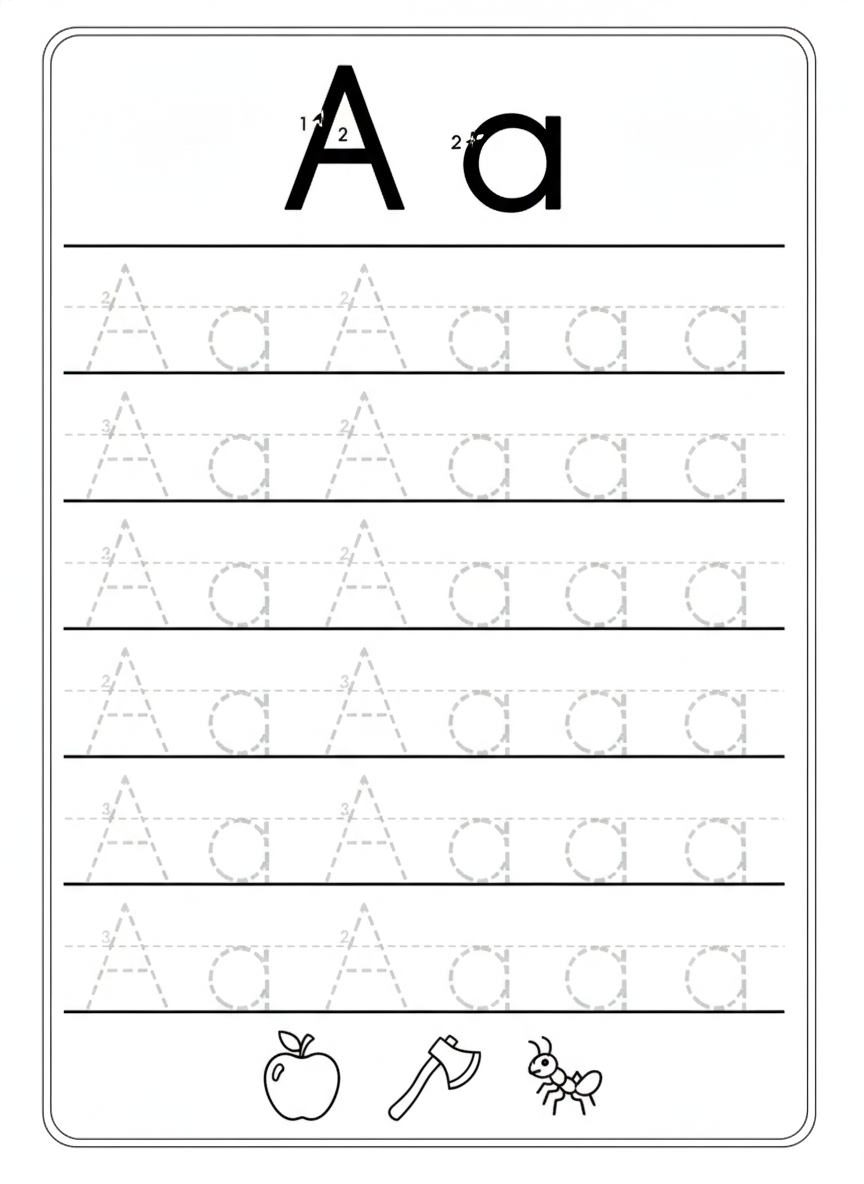
AI worksheet generator result: a kindergarten letter tracing sheet with a large solid A and a lowercase a at the top carrying stroke-order numbers, six ruled practice rows of dotted trace letters below on three-line handwriting guides, and an apple, an axe and an ant drawn along the bottom. The letterforms are the win here — every A and every a is correctly shaped, the lowercase is a proper single-storey handwriting a rather than the two-storey typographic one, the baselines are solid and the midlines dashed exactly as a school guide sheet has them, and the three picture prompts all genuinely start with the letter. Two honest deviations: four practice rows were asked for and six came back, and the alternating A-a-A-a pattern breaks after the fourth glyph so the later rows run A a A a a a. Neither hurts a child tracing it, but if you need an exact row count, count before you photocopy.
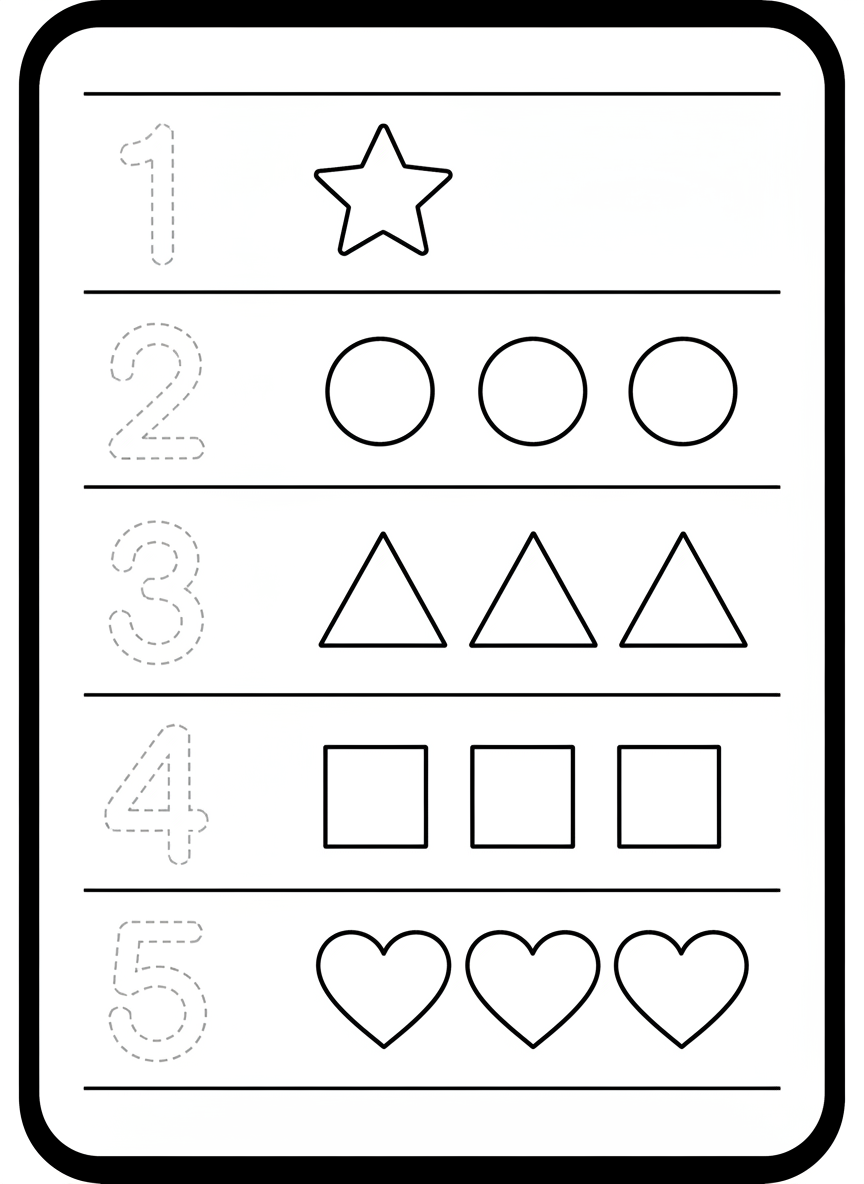
AI worksheet generator result: a preschool counting and number tracing sheet with five ruled rows, each holding a large dotted numeral to trace on the left and a group of shapes to count on the right. This is the frame that shows the tool failing, and it is on the page deliberately. The numerals are perfect — 1 through 5, all correctly formed, all in clean dashed trace outline. The counting is not. Row one is right: numeral 1, one star. Every row after it came back with three objects regardless of the numeral beside it, so 2 sits next to three circles, 4 sits next to three squares and 5 sits next to three hearts. Three of the five rows are mathematically wrong. Counting a specified number of drawn objects is the single most reliable failure in this whole tool, and it is why the answer below is to count every quantity yourself before the sheet reaches a child.
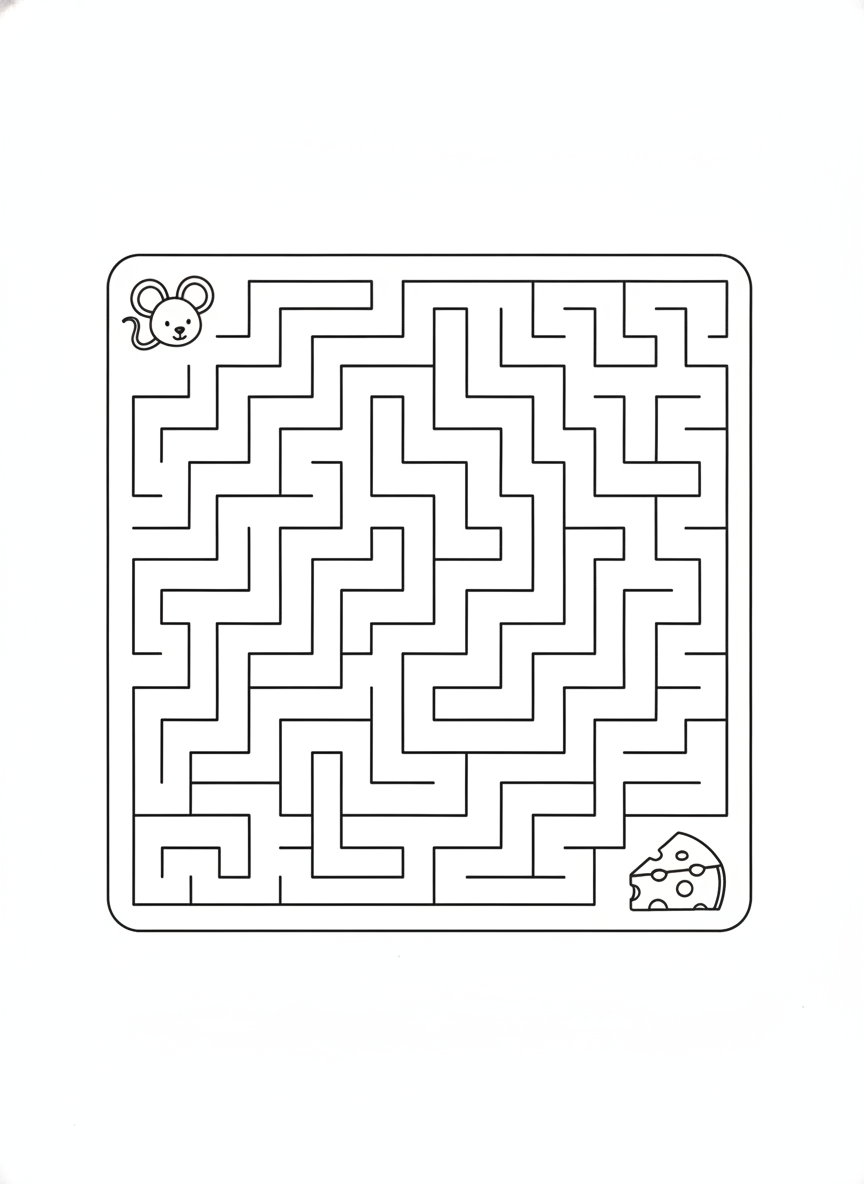
AI worksheet generator result: a wordless printable maze puzzle, a large square grid of clean unbroken black corridors with a friendly outline mouse in the top left corner and a wedge of holed cheese in the bottom right. As line art it is excellent — uniform corridor width, crisp square corners, continuous walls with no broken or floating segments, and not one stray letter or number anywhere on the page, which is the hardest thing to get out of an image model. What it is not is a verified maze. Nothing checks that a continuous path actually connects the mouse to the cheese, and the outer wall came back sealed, with the mouse and the cheese placed inside the border rather than outside two openings as the brief asked. Trace the route with a finger before you print thirty copies. This is the one worksheet type where the picture is convincing and the logic underneath is unchecked.
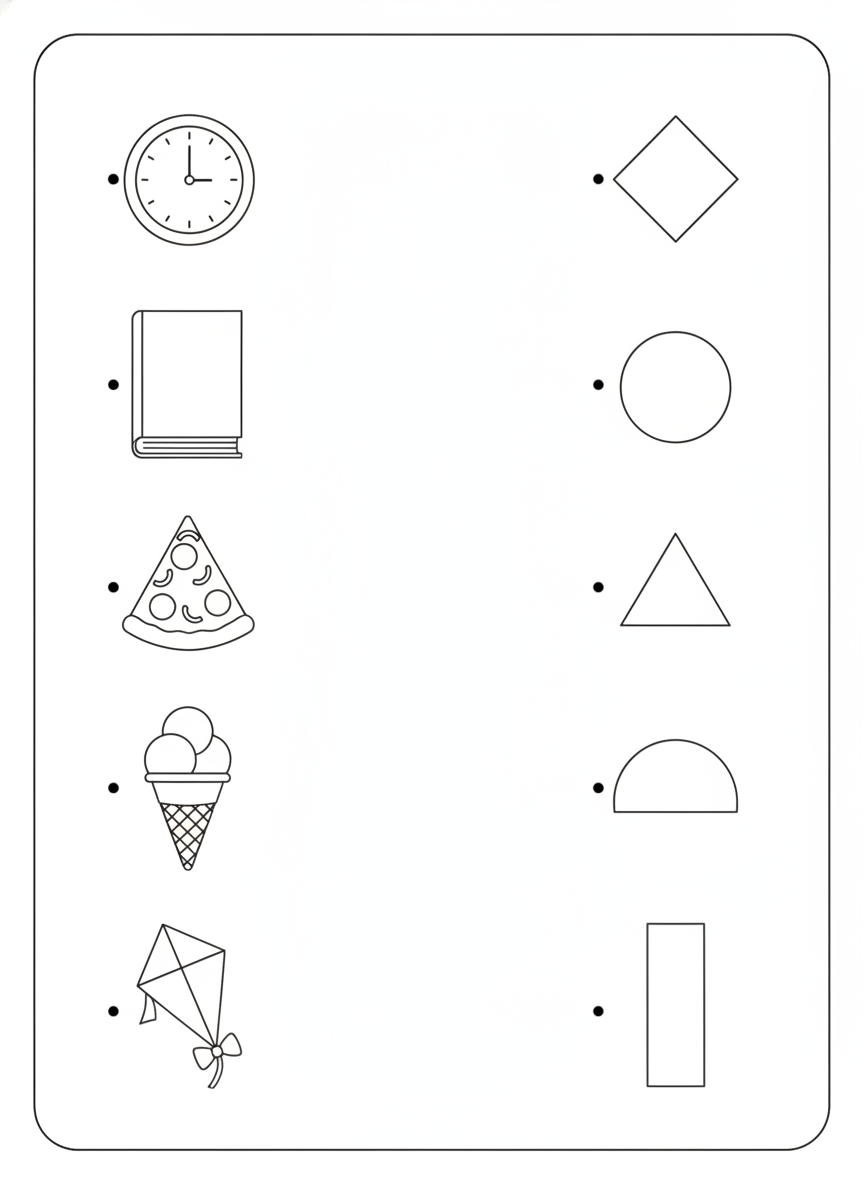
AI worksheet generator result: a wordless shape matching activity with five outline objects down the left — a clock, a book, a slice of pizza, an ice cream cone and a kite — and five geometric shapes down the right in scrambled order, each item marked with a small hollow dot for the child to draw a connecting line from. The execution is clean: five and five, correct count on both sides, dots aligned on the facing edges, no lines pre-drawn, generous white space in the middle to work in, and the clock face rendered with tick marks instead of numerals so the no-text rule survives. The pedagogical flaw is worth catching. A pizza slice is a triangle and an ice cream cone is also a triangle, so two objects compete for one shape and the answer key is not unique. The generator matched the visual brief exactly and still produced a puzzle with an ambiguous solution.
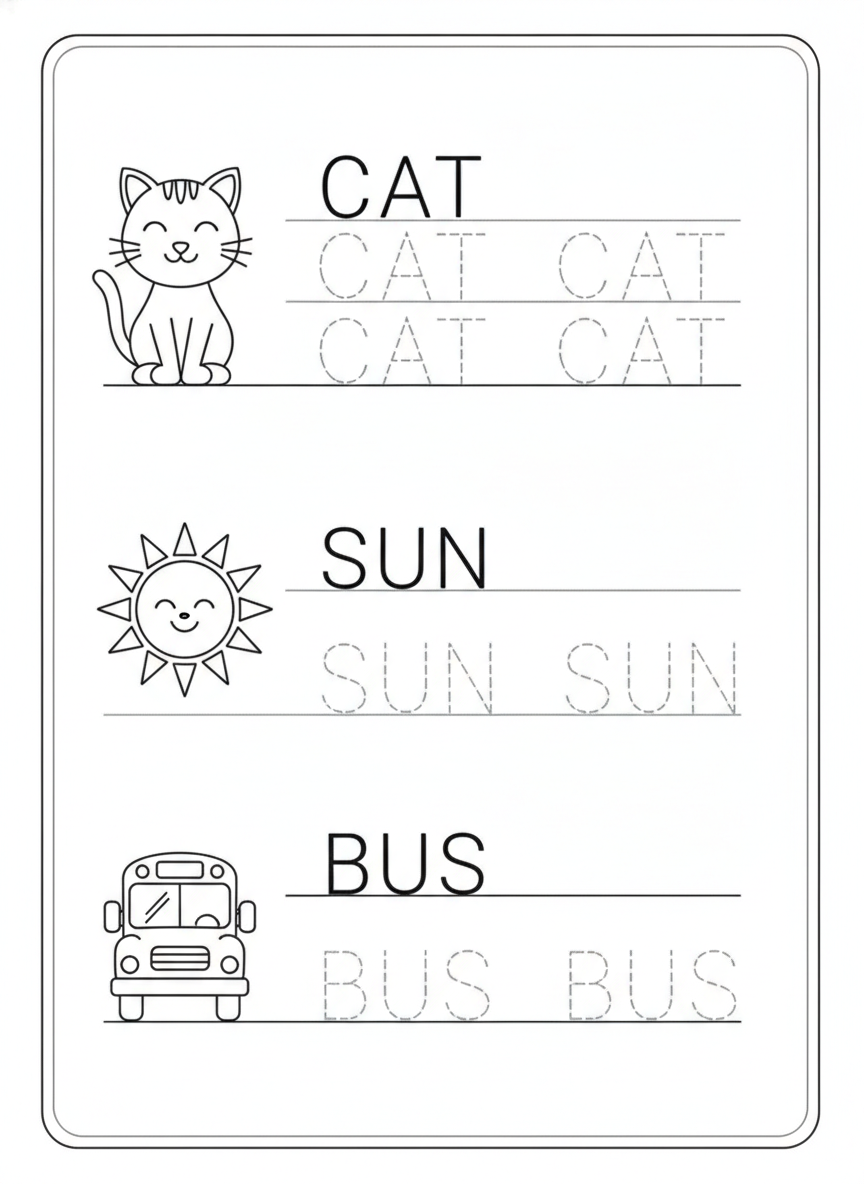
AI worksheet generator result: a first grade handwriting sheet with three blocks — a cat, a sun and a bus, each drawn in friendly outline beside its word set as a solid black model with dotted trace copies underneath. Every word is spelled correctly: CAT, SUN, BUS. That is the whole reason these words are three letters long. Short, common, all-capital words come back right nearly every time, and the letterforms here are clean, evenly spaced and consistent in weight between the model and the traces. The layout drifted rather than the spelling. The CAT block got two trace rows while SUN and BUS got one each, so the three blocks are not the identical structure that was briefed, and the dashed midline and top line of the three-line guide were dropped in favour of a single baseline rule per row.
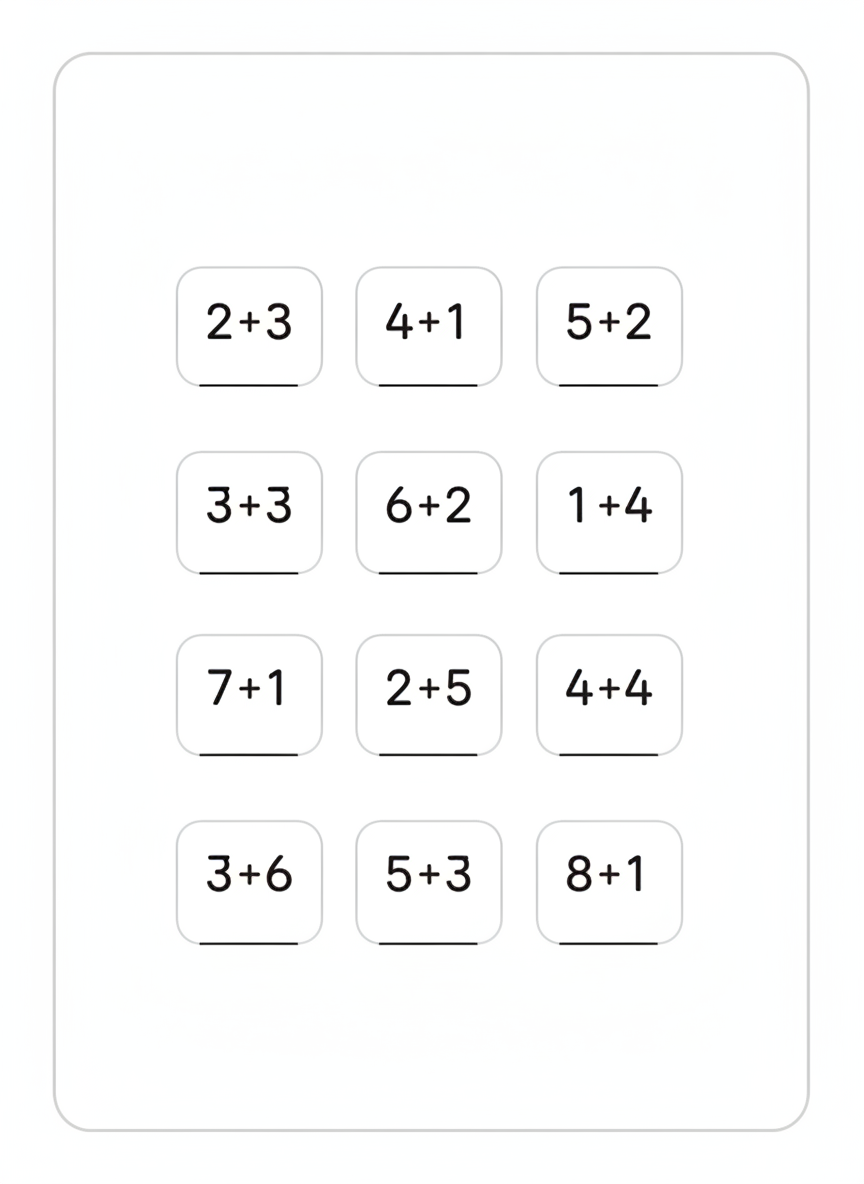
AI worksheet generator result: a single-digit addition sheet, twelve problems in a four-by-three grid of soft rounded boxes with a short answer rule under each one. This is the best frame on the page and the one that explains where the tool is genuinely strong. Twelve specific sums were dictated in the prompt — 2+3, 4+1, 5+2, 3+3, 6+2, 1+4, 7+1, 2+5, 4+4, 3+6, 5+3, 8+1 — and all twelve came back exactly right, in exactly that order, with every plus sign symmetrical and every answer space left blank. Zero errors across twenty-four numerals. The layout, not the maths, is what drifted: the sums were briefed stacked vertically in column form and arrived written horizontally, the answer rule sits under the edge of each box rather than inside it, and the boxes sit small in a lot of empty page.
How the AI Worksheet Generator Works
Pick the activity type
Tracing, counting, maze, matching, handwriting or math. Each preset already carries the page furniture a printable needs — portrait layout, white paper, a border, correct three-line handwriting guides, and a long clause forbidding titles, name lines, page numbers and watermarks. That scaffolding is the part you would otherwise have to write out every time.
Dictate the actual content
This is the step that decides whether the sheet is usable. Name the letter, list the twelve sums, write out the three words. Content you spell out lands accurately — all twelve dictated addition problems came back correct. Content you leave to the model is where quantities go wrong and spellings drift.
Proofread, then print
Twenty seconds later you have a page. Before it reaches a child, count every group of objects, read every word, and if it is a maze, trace the route with a finger. Then download at full resolution and run one test print to check the margins before you photocopy a class set.
What This AI Worksheet Generator Gets Right, and What It Gets Wrong
Classroom material is an unforgiving subject for an image model, because a worksheet is mostly symbols and structure and a single wrong digit makes the whole page unusable. Here is exactly where the line falls, based on the six sheets above.
Dictated symbols are near-perfect
Twelve addition problems were listed explicitly in the prompt and twelve came back correct, in the right order, across twenty-four numerals and twelve plus signs. Numerals 1 to 5 on the counting sheet were all correctly formed. If you write the exact symbols you want on the page, you get them. This is by far the most useful thing to know about the tool.
Counted quantities are the reliable failure
Ask for four squares and you are as likely to get three. On the counting sheet in the gallery, only the first of five rows had the right number of objects — every row after it defaulted to three regardless of the numeral beside it. If a sheet depends on quantity, count every group yourself. This does not improve much with better prompting; it is a limit of the model.
Short words are safe, long words are not
CAT, SUN and BUS all came back spelled correctly with clean consistent letterforms. Three or four letters, common vocabulary and print capitals is the safe zone. Past about six letters, or with unusual proper nouns, letters begin to drop and transpose, and a misspelling on a worksheet still looks entirely convincing until you actually read it.
The page furniture is genuinely good
Solid baselines with dashed midlines, dotted trace outlines that read as traceable rather than as grey mush, evenly ruled rows, clean borders and real white margins. The visual language of a printable is well understood, which is why these sheets do not look like AI pictures of worksheets — they look like worksheets.
Puzzle logic is drawn, not solved
The maze has beautiful uniform corridors and no guarantee that a path connects the entrance to the exit — and the outer wall came back sealed, with both characters placed inside it. The matching sheet paired a pizza slice and an ice cream cone against a single triangle, so two answers compete. The picture is of a puzzle; the puzzle underneath is unverified.
Exact layouts drift, and it rarely matters
Four practice rows became six. Blocks briefed as identical came back with different row counts. Sums asked for in vertical column form arrived horizontally. None of this makes a sheet unusable, and all of it means you should not rely on a generated page to hit a precise structural spec if you are assembling a workbook where every page must match.
Writing a Prompt That Produces a Usable Worksheet
Four habits that separate a sheet you can photocopy from one you have to regenerate, learned from the six in the gallery.
Dictate content, do not describe it
"Twelve addition problems" invites invention. Listing 2+3, 4+1, 5+2 and the other nine gets you those nine. The same holds for letters, words and picture prompts. Every element you name is an element that cannot come back wrong.
Name every text element you do not want
"No text" is far too weak — the model has seen a million worksheets with a heading and a name line and will add one back helpfully. Enumerate them: no title, no instruction line, no name line, no date line, no page number, no footer, no watermark.
Keep words under six letters
Short, common, all-capital words are the safe zone for rendered text. If a sheet needs a sentence of instructions or a paragraph to read, generate the artwork here and add the text yourself afterwards rather than asking the model to write it into the image.
Generate portrait, print a test copy
A portrait ratio matches A4 and US Letter, so nothing important lands in the margin. Download at full resolution — a full page at 300 dots per inch wants around 2,500 pixels across — and run one sheet through the printer before you commit to thirty.
Who Uses an AI Worksheet Generator
Classroom teachers
The sheet you need is almost never the sheet you can find. Being able to make a tracing page for exactly the letter you are teaching on Tuesday, with picture prompts that match the words your class already knows, is worth more than a subscription to a library of near-misses.
Homeschool parents
One child, one pace, and no reason to buy a workbook where four fifths of the pages are the wrong level. Generate the next sheet when the last one is finished, at whatever difficulty that child is actually at today, and stop paying for the pages you skip.
Tutors and interventionists
Targeted practice on one specific gap, produced between sessions in under a minute. A student who keeps reversing a particular letter needs a page of that letter, not a page of the whole alphabet, and that page does not exist until you make it.
Early-years and SEN settings
The wordless presets matter here. Mazes and matching columns carry no reading load at all, so the same activity works for a pre-reader, an EAL learner and a child who finds a text-heavy page overwhelming, and the fine-motor practice is identical.
Marketplace sellers
A first draft of a printables pack in an afternoon rather than a fortnight. The economics only work if you proofread properly — count every quantity and read every word before it goes on sale, because a review is an expensive place to find a miscount.
Anyone who needs it tonight
Cover work for a class you are not teaching, a quiet activity for a long journey, something for the school fete table. Twenty seconds and a printer, with no account needed to try it and nothing to install.
AI Worksheet Generator FAQ
Related Classroom & Printable Tools
AI Coloring Page Generator
The pure line-art neighbour of this tool. Where a worksheet gives a child a task — trace this, count these, match those — a coloring page gives them a scene, so it is the right choice for wet play, early finishers and calm-down time.
AI Image Tools for Education
The wider view of what image generation is useful for in a school: diagrams, display material, story prompts and lesson illustrations, and a realistic account of where each one is and is not dependable.
AI Children's Book Illustration Generator
For when the page needs a character rather than a task. Consistent illustration across a set of pages, useful for reading material you are writing yourself and for the picture prompts that sit alongside a phonics sheet.
Make the Sheet You Actually Need
Six activity types — letter tracing, counting, mazes, matching, handwriting and math — each one a clean printable page in about twenty seconds, with your exact content dictated onto it. Up to 4K. Free to start, from $2.99.
Make a Worksheet FreeAn AI Worksheet Generator for Teachers, Tutors and Homeschool Parents
The problem an AI worksheet generator solves is not that worksheets are hard to find. There are millions of them, and that is the problem: you spend twenty minutes filtering a printables site and end up with a sheet that is nearly right, on the wrong letter, at the wrong level, with a publisher's logo across the footer and a name line where you wanted more space. Making the page yourself takes an hour in a word processor fighting with dotted fonts and table borders. So most teachers compromise, and the compromise is the sheet the class actually gets. Describing the page you want and having it appear twenty seconds later changes which of those options is the cheap one.
The six presets here cover the activities that get printed most in early-years and primary classrooms. Letter tracing with correct three-line handwriting guides and picture prompts that start with the target letter. Counting rows that pair a traceable numeral with a group of objects. Wordless mazes and matching columns, which carry no reading load at all and therefore work for pre-readers, EAL learners and anyone who finds a dense page discouraging. Handwriting blocks built on short high-frequency words. And a grid of single-digit sums with the answer spaces left blank. Each preset carries the page furniture with it — portrait layout, white paper, borders, ruled rows — and an explicit clause naming every title, heading, name line, page number, footer and watermark that must not appear, which is why the sheets in the gallery above come back clean rather than covered in invented branding.
Those six sheets are shown exactly as they were generated, mistakes included, because the strengths and weaknesses of this AI worksheet generator are consistent enough to be worth learning before you rely on it. The pattern is simple: dictated symbols are excellent and inferred quantities are not. Twelve addition problems written out one by one in the prompt came back all twelve correct across twenty-four numerals. The counting sheet, where the model had to draw a specified number of objects, got only the first of five rows right and defaulted to three objects in every row after it — three mathematically wrong rows on a page that looks entirely professional at a glance. Short words are safe, and CAT, SUN and BUS all rendered perfectly; longer words are where spellings quietly break. Puzzle logic is drawn rather than solved, so the maze has no guaranteed path and the matching sheet produced two objects competing for one shape.
The working rule follows from that. Dictate everything that matters, name every text element you do not want, keep individual words under about six letters, and treat the finished image as a first draft that needs one proofread pass — count every group of objects, read every word, trace every maze — before it reaches a child or goes on sale in a printables pack. What you get in exchange is a page that is exactly the letter, the number range and the vocabulary your class is on this week, rather than the closest thing somebody else happened to publish. That is a genuinely different position to teach from, and it takes about twenty seconds.