
AI Paint by Numbers Generator
Turning a photograph into a paintable canvas is really one decision made over and over: how few flat tones can this image survive being reduced to. This AI paint by numbers generator makes that decision visible in about twenty seconds — upload a photo, pick how coarse or fine the kit should be, and see the posterized regions and their numbers before you commit a canvas, a palette or a customer order to it.
Upload a Photo FreeTry the Paint by Numbers Generator — Free
Upload the photo you want to paint, then choose a kit style. The presets differ mainly in how many flat tones the picture is reduced to, because that is what decides whether a template is a relaxing evening or a three-week project.
AI Paint by Numbers Generator
Upload a photo, choose a kit style, and get a numbered paint by numbers template at up to 4K
Upload a photo — crop it tight on the subject first — then pick a kit style and click Generate
Templates From the Paint by Numbers Generator
Six unedited examples, flaws included: a posterized retriever, a before-and-after against the source photo, a half-painted lavender canvas, a numbered palette legend, a template on an easel and a macro of the region edges. The pattern across all six is consistent and worth internalising. Composition, tonal reduction and staging come back reliably — you can genuinely judge whether a photo survives flattening from these. The numbering does not: the palette legend uses 2, 6, 10, 11 and 15 twice each and skips 9, 12 and 14, the landscape legend is pseudo-lettering, and the cat template numbers one half of the face and forgets the other. Read these for the shapes, and verify every digit yourself.
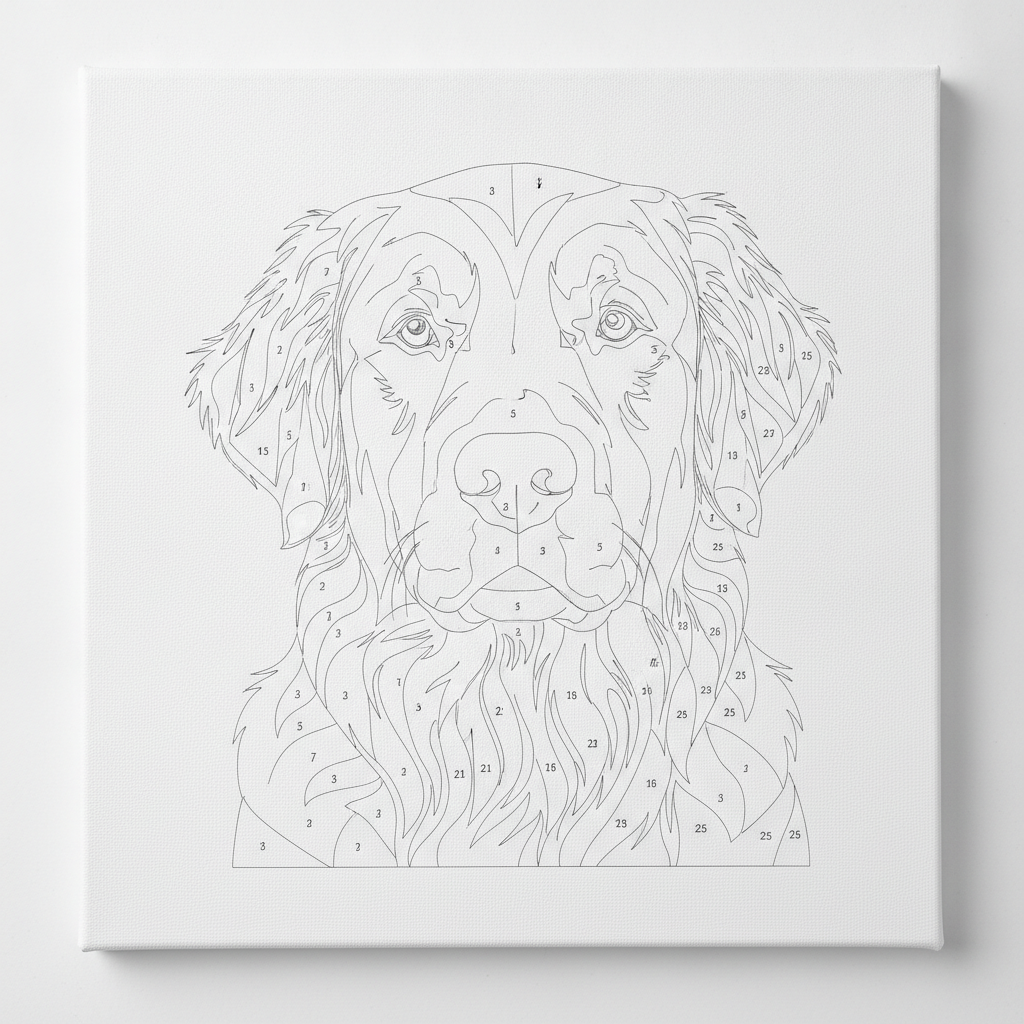
AI paint by numbers generator result: a golden retriever portrait posterized into outlined regions on a white canvas board, with small printed numbers scattered through the ears, muzzle and chest. The likeness and the tonal reduction are both right, and the numbers are legible. What is wrong is the line weight and the fur: the outlines are hairline grey rather than solid black, and the coat is drawn as individual strands, so a lot of what looks like regions are open slivers narrower than any brush
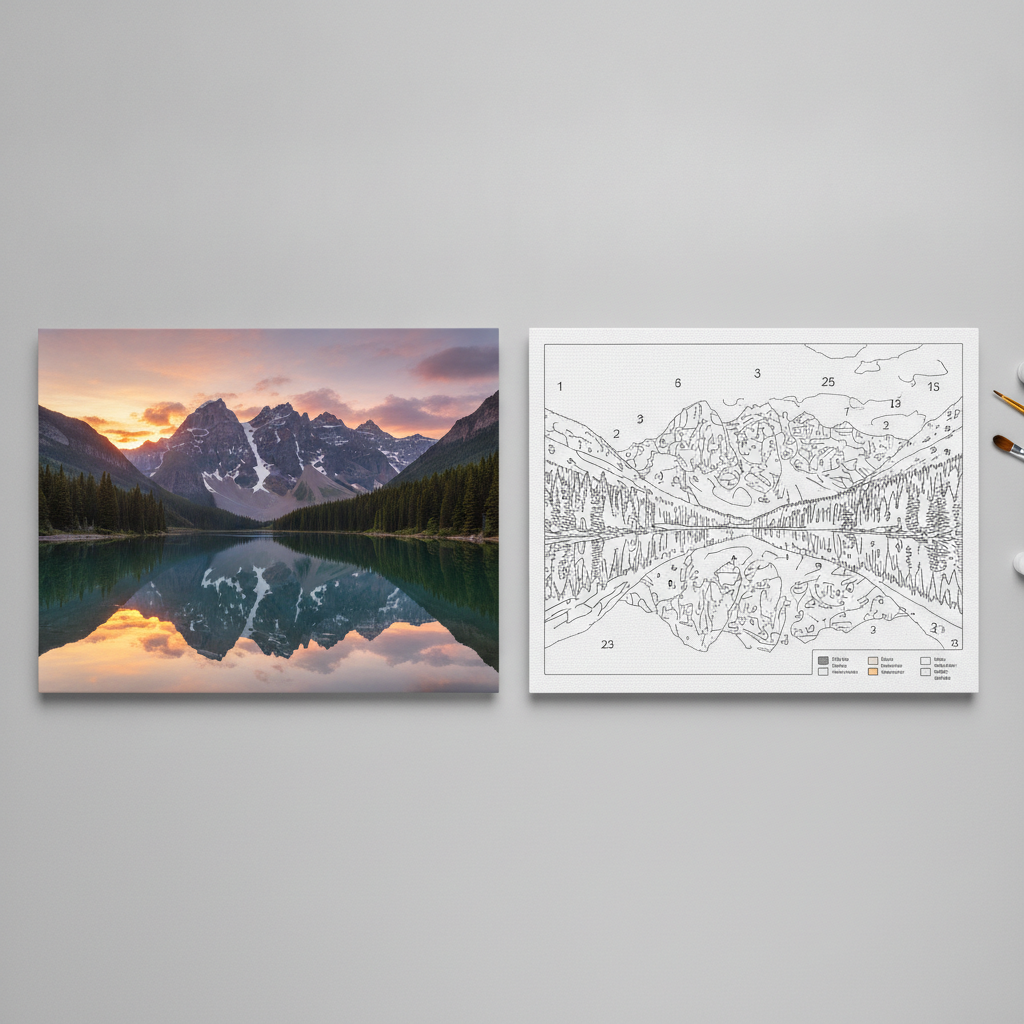
A two-panel comparison on a grey desk: the source photograph of a mountain lake at sunset on the left, the same scene converted into a numbered outline template on the right, with brushes and paint pots at the edge of frame. The conversion holds its composition — sky bands, ridge line, tree mass and reflection all survive — but two flaws show. The printed colour legend in the bottom corner is pseudo-lettering rather than real colour names, and whole areas of sky and water carry no number at all
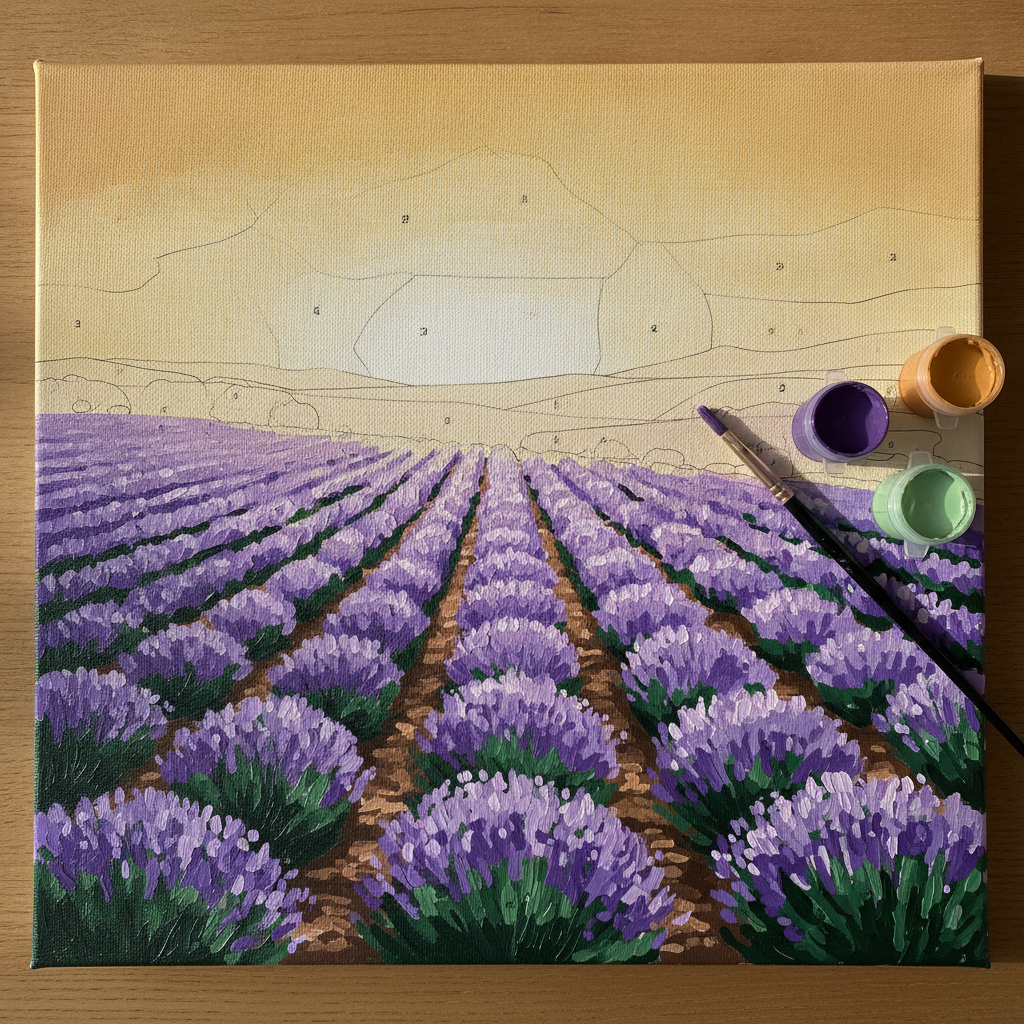
A half-finished paint by numbers canvas of a lavender field on a wooden table: the lower two thirds filled in with flat purple and green acrylic, the top third still blank with faint outlines and numbers across the sky and hills, paint pots and a brush resting on the canvas edge. The strongest frame of the six and the one closest to a usable listing photo. The one inconsistency is that the painted half carries brush texture and highlight flecks that the flat numbered regions above it could never produce
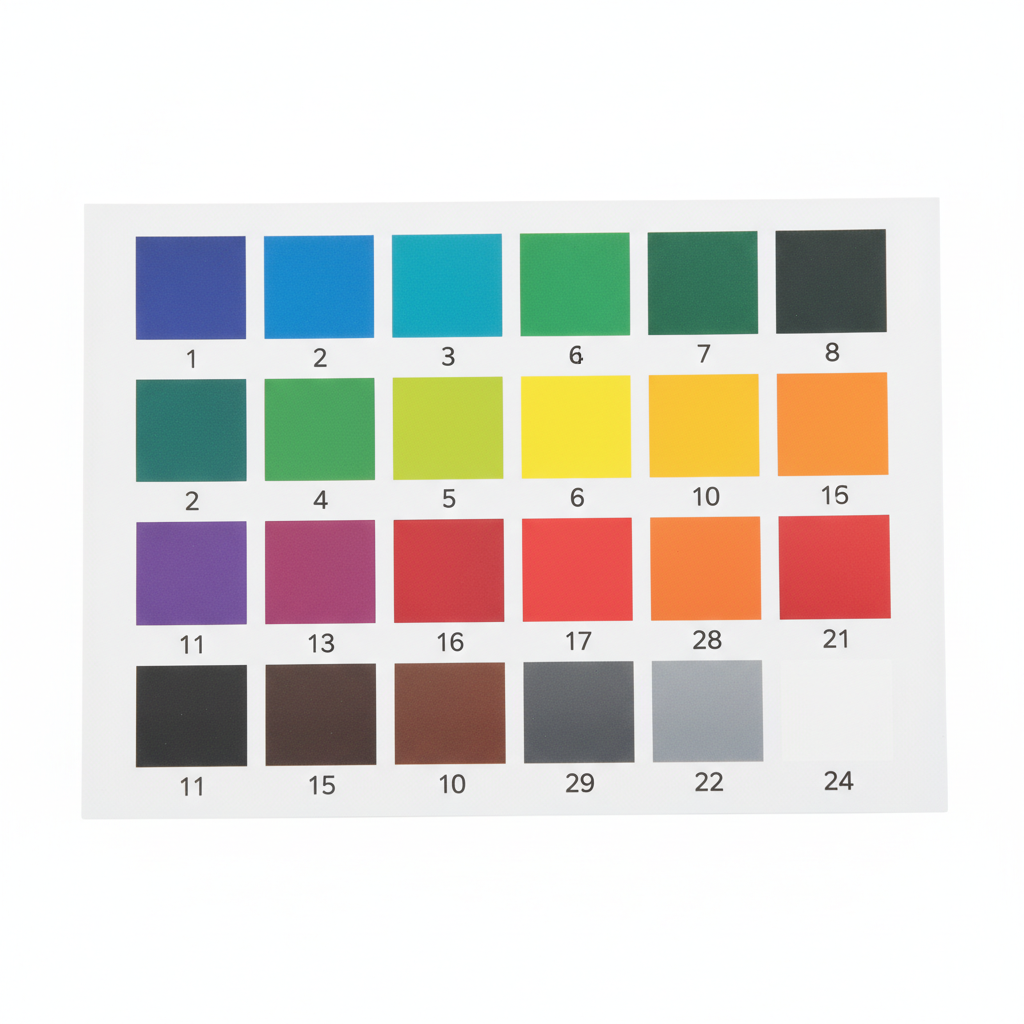
A numbered acrylic paint legend for a paint by numbers kit: twenty-four flat colour swatches in a grid on white card, each with a printed number beneath it. The digits here are the crispest in the set — and the indexing is still wrong. Numbers 2, 6, 10, 11 and 15 each appear twice on different colours, and 9, 12 and 14 are missing entirely. This is the clearest illustration on the page of why a render is a design rather than a manufacturing file
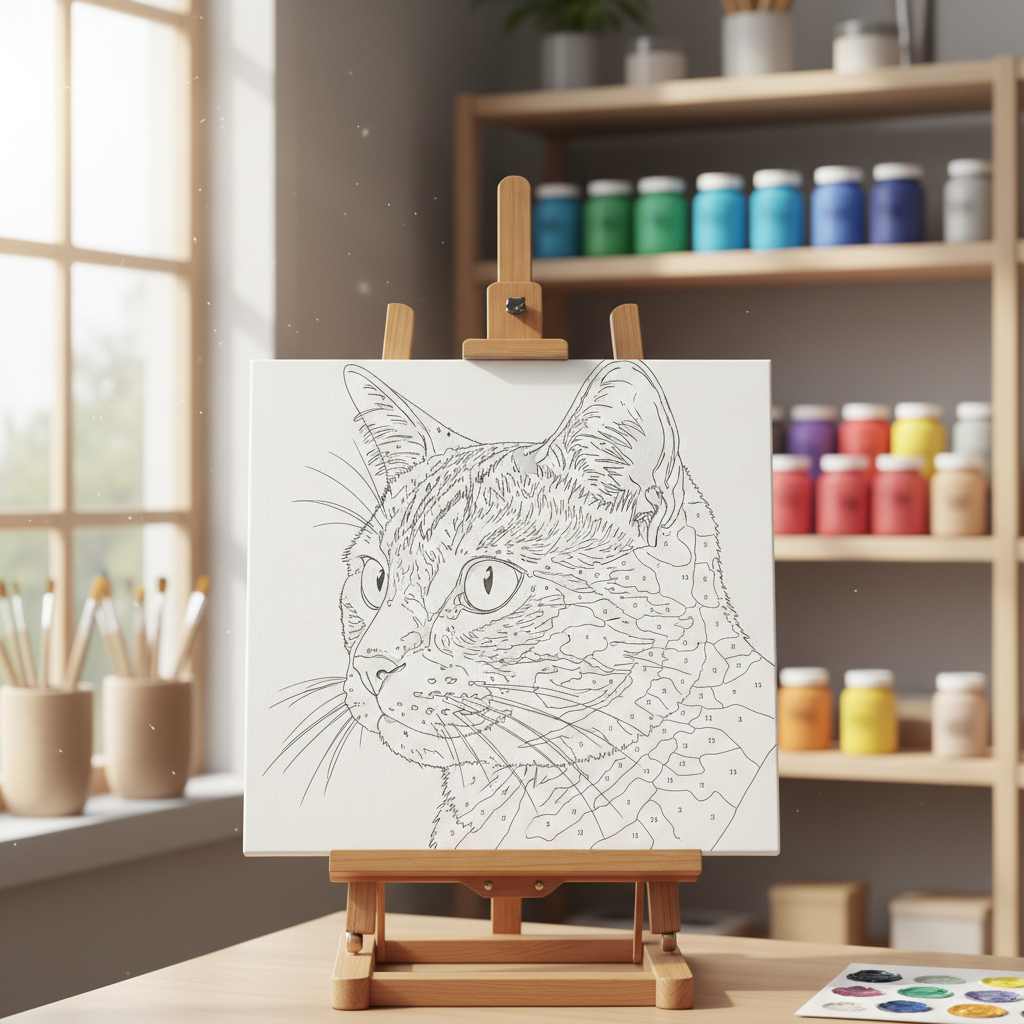
A paint by numbers outline template of a tabby cat on a wooden easel in a bright craft room, with shelves of paint jars blurred behind it. The staging is convincing enough to use as a product shot, but the template is the weakest of the six: whiskers and fur are open lines that never close into regions, and the numbering is lopsided, with the right side of the face packed with tiny digits while the left half carries almost none
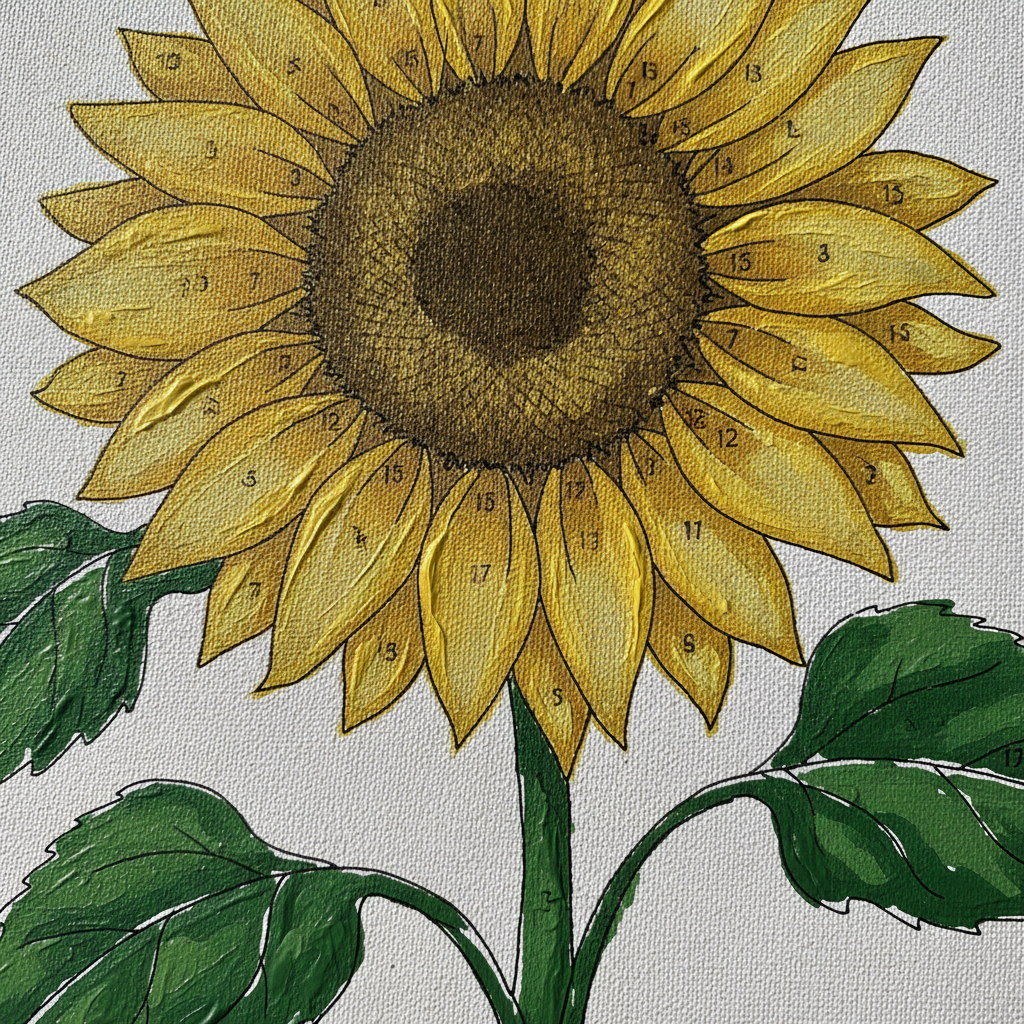
A macro close-up of a paint by numbers canvas showing a sunflower with thick yellow petals and green leaves already painted, small numbers still visible printed across the petals. Useful for seeing how region edges and paint meet at close range, though it has drifted past the brief: it is a finished painting with numbers left showing rather than a template being filled in, and a real kit hides those digits under the paint
How the AI Paint by Numbers Generator Works
Upload the photo you want to paint
A pet, a face, a house, a view. Crop it tight on the subject before uploading, because whatever fills the frame is what gets the paintable regions — a subject sitting small in the middle of a wide shot spends most of its tones on background nobody wants to paint.
Pick how coarse the kit should be
Beginner flattens the picture to about twelve big confident tones; the classic kit uses around twenty-four for likeness; pet, portrait and landscape presets spend their regions differently again, putting detail into fur and eyes, or into a horizon line, and calming everything else down.
Check it, then print or rebuild it
Templates come back in about twenty seconds at up to 4K. Zoom in and read the numbers before you trust them. For a canvas at home, print and paint. For a kit you intend to sell, use it as the approved design and rebuild the outlines and indexing in a vector editor.
What a Render Settles, and What a Real Kit Still Needs
Six things decide whether a paint by numbers template actually works when somebody sits down with a brush. An image model gets you most of the way on about half of them, and cannot help with the rest. Knowing which half is the difference between a template you can paint and a picture of one.
Tone count is the whole design
Every other choice is downstream of how many flat colours the photo is reduced to. Twelve is an evening and a beginner can finish it; twenty-four is where faces start looking like the person; past thirty the regions get smaller than the brush and the numbers stop fitting. Generating the same photo at two densities and comparing is the fastest way to settle it.
Region indexing has to be verified
In a manufactured kit, every region labelled 7 is the same paint, no two touching regions share a number, and the legend matches the pots in the box. A render produces plausible numbers, not a checked index. That verification is a vector-editor job, and it is the main reason a commercial kit still needs one.
Small digits are the known failure mode
Image models are weakest at small lettering, and this is a picture made almost entirely of small lettering. Digits inside narrow regions get squeezed or doubled. Larger regions help, banning every other text surface helps, and reading the output at full zoom before printing is not optional.
Gradients do not survive posterizing
A sunset that works because of its smooth falloff becomes visible banding once flattened, which can look deliberate or can look like a mistake. Subjects with clear shapes and strong tonal separation reduce well; subjects whose appeal is soft light or fine texture generally do not, and no amount of prompting changes that.
Canvas size is a physical constraint
The same template is comfortable on a 40x50cm canvas and unpaintable on a 20x20cm one, because region size scales with the print while brush width does not. Decide the physical size first, then choose a tone count that leaves the smallest regions wider than the smallest brush you own.
You still need rights to the photo
The output licence is covered on paid plans, but the input is yours to clear. A customer sending you their own pet photo is fine; a photograph pulled from a search page is not, and neither is a portrait of someone who has not agreed to it. This matters most for exactly the case that pays best — custom commissions.
Why Use This AI Paint by Numbers Generator
Presets that differ by density, not decoration
Beginner and classic change the number of flat tones, which is the decision that actually changes the painting experience. Pet, portrait and landscape change where those tones get spent — into fur and eyes, into skin bands, or into a horizon.
Works from your own photograph
This is an upload-led tool, not a describe-a-scene one. The whole point of a custom kit is that it is your dog, your house or your wedding photo, and none of those can be conjured from a sentence.
Flat regions specified, texture banned
Every preset asks for closed shapes with no shading, gradient or brush texture inside them, because a region that still contains photographic detail is not a paintable region — it is a filter effect that happens to have lines on it.
A mockup preset for sellers
The half-painted kit preset returns a staged product photo with paint pots and a brush, which is the image an Etsy listing or a client preview actually needs, rather than a bare template that shows a buyer nothing about the finished result.
Cheap enough to test two densities
About twenty seconds and a few cents per attempt means running the same photo at twelve and twenty-four tones before choosing is routine. That comparison is the single most useful thing you can do, and it used to cost an afternoon.
4K output for real printing
Thin outlines and small digits are the first casualties of a low-resolution export. Downloading at up to 4K is what makes the difference between a template that prints cleanly onto a large canvas and one that goes soft at the edges.
AI Paint by Numbers Generator FAQ
Related Design Tools
AI Coloring Page Generator
The description-led sibling of this page: clean black line art with no colour information, drawn from a sentence rather than posterized from your photo.
AI Photo to Painting
When you want the finished painting rather than the instructions for making one — the same photo rendered as oil, watercolour or acrylic in a single step.
AI Color Palette Generator
Useful before you buy paint. Pull a coherent set of flat colours out of an image and check they still read as your subject once separated from it.
Turn Your Photo Into a Template
Five kit styles, two tone densities, a seller-ready mockup preset and 4K downloads. Free to start, from $2.99 for more.
Upload a Photo FreeAbout This AI Paint by Numbers Generator
A paint by numbers template is a compression problem dressed up as a craft product. Somewhere inside a photograph of your dog there are millions of distinct colours, and the job is to throw almost all of them away — down to twelve, or twenty-four, or thirty — in a way that leaves the dog still recognisably itself when a person fills the remaining shapes in with flat acrylic. Everything else follows from that single reduction: how big the regions are, whether the numbers fit inside them, how long the canvas takes to paint, and whether the finished thing looks like a portrait or like a map. An AI paint by numbers generator is worth using because it makes that reduction visible in twenty seconds instead of an afternoon, and because seeing it is the only reliable way to judge it.
That is why the presets on this page are organised around tone density rather than around subject matter alone. The beginner preset flattens a picture to roughly twelve tones with deliberately generous regions, which is what a child or a first-time painter can finish in a sitting; the classic kit preset uses about twenty-four, the density where likeness returns to faces and where most retail kits actually sit. The pet, portrait and landscape presets then decide where those regions get spent — into eyes, nose and the banded direction of fur; into stepped skin tones that keep the modelling of a cheekbone; or into wide horizontal sky bands with a crisp horizon and massed foliage. Every one of them specifies closed shapes with no shading, gradient or photographic texture inside, because a region that still contains detail is not something anyone can paint. Nano Banana Pro handles this kind of instruction-following on an uploaded image well, which is what makes an image-to-image approach viable here at all.
It is worth being equally clear about what the output is not. A manufactured kit is built from vector line work with a verified index: every region marked 7 corresponds to one pot of paint, no two adjacent regions carry the same number, and the printed legend matches what is in the box. What comes back from any image model is a high-resolution picture of a template — the regions are genuine and the layout is genuine, but the numbering is drawn rather than computed, and small digits inside narrow shapes are the known weak point of the entire technology. The presets push back on this by asking for larger regions and by banning titles, captions, watermarks and signatures by name, so the only characters on the canvas are the region numbers themselves. Zoom in and proofread before you print. For a canvas you are painting at home that is usually the end of it; for a kit going to a printer, the render is the approved design and the indexing gets rebuilt properly in a vector editor.
In practice most people arrive at this AI paint by numbers generator for one of three jobs. They want a custom canvas from a photograph that means something to them, in which case tight cropping and an honest look at whether the photo survives flattening matter more than any other choice. They are selling custom kits or canvases and need a preview to show a buyer before any paint is mixed — which is what the half-painted kit mockup preset exists for, since a bare outline sells nothing. Or they are teaching, and need a dozen templates at a difficulty a classroom can finish, which is the beginner preset run a dozen times. All three are cheap: about twenty seconds per template, up to 4K on download, free to start and paid plans from $2.99. Running the same photo at two different tone counts and putting the results side by side costs less than a minute and answers the only question that really matters.