
AI Object Remover
Deleting something from a photo is the easy half. The hard half is what goes in the hole — the sand, the brickwork, the wallpaper, the sky that was hidden behind whatever you erased. Clone-stamp tools smear it, cheap patch tools leave a blurred bruise where the object used to sit. This AI object remover runs on Nano Banana Pro, which rebuilds the covered area from the surrounding scene, so the trash bin, the photobomber, the parked car or the stray cable is gone and the background reads as though it was never interrupted. Upload a photo, say what to erase, download in about twenty seconds.
Try It Now — Free
Upload your photo, pick the kind of removal you need, and name the specific thing you want gone in the details box. Your cleaned-up image comes back in about twenty seconds at up to 4K.
AI Object Remover
Upload a photo, choose what kind of thing to erase, and get it back with the background seamlessly rebuilt
Upload your photo, choose a removal preset, then name the exact object you want erased
Photos Cleaned Up With This AI Object Remover
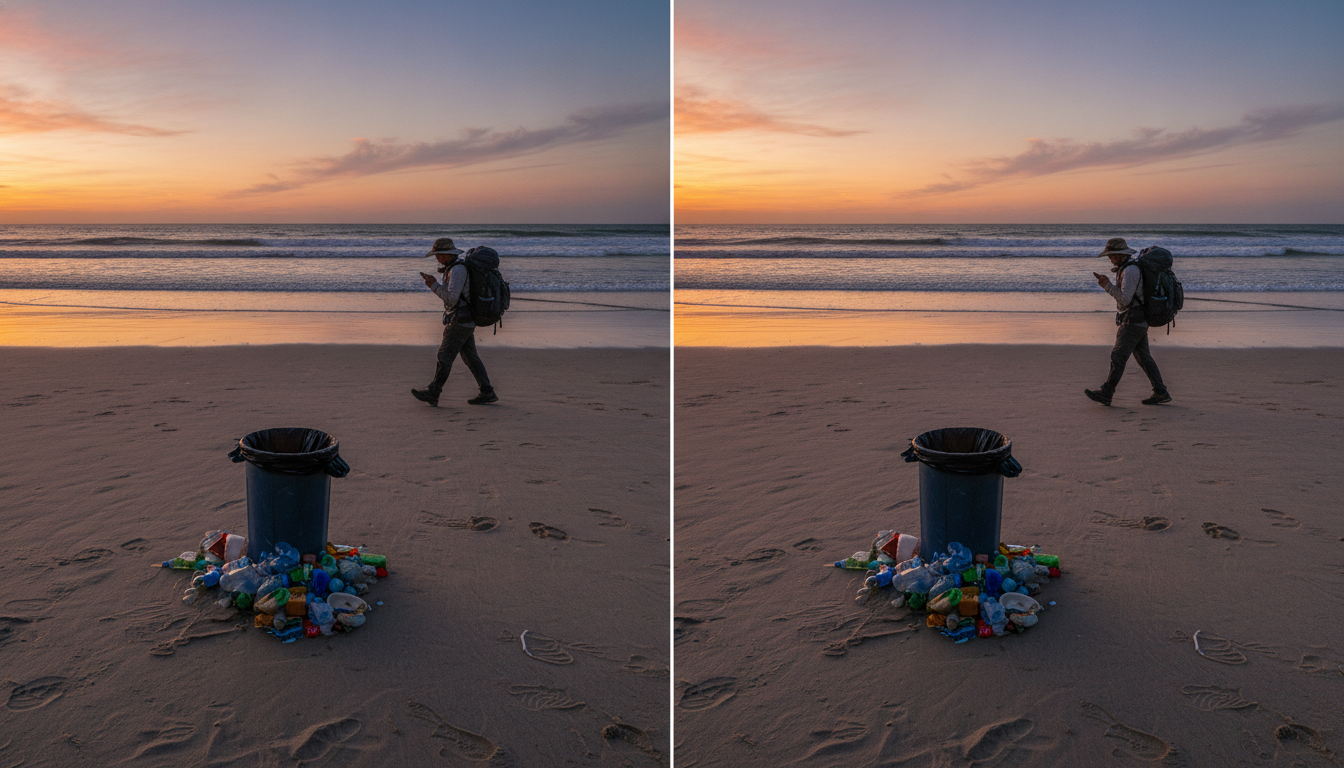
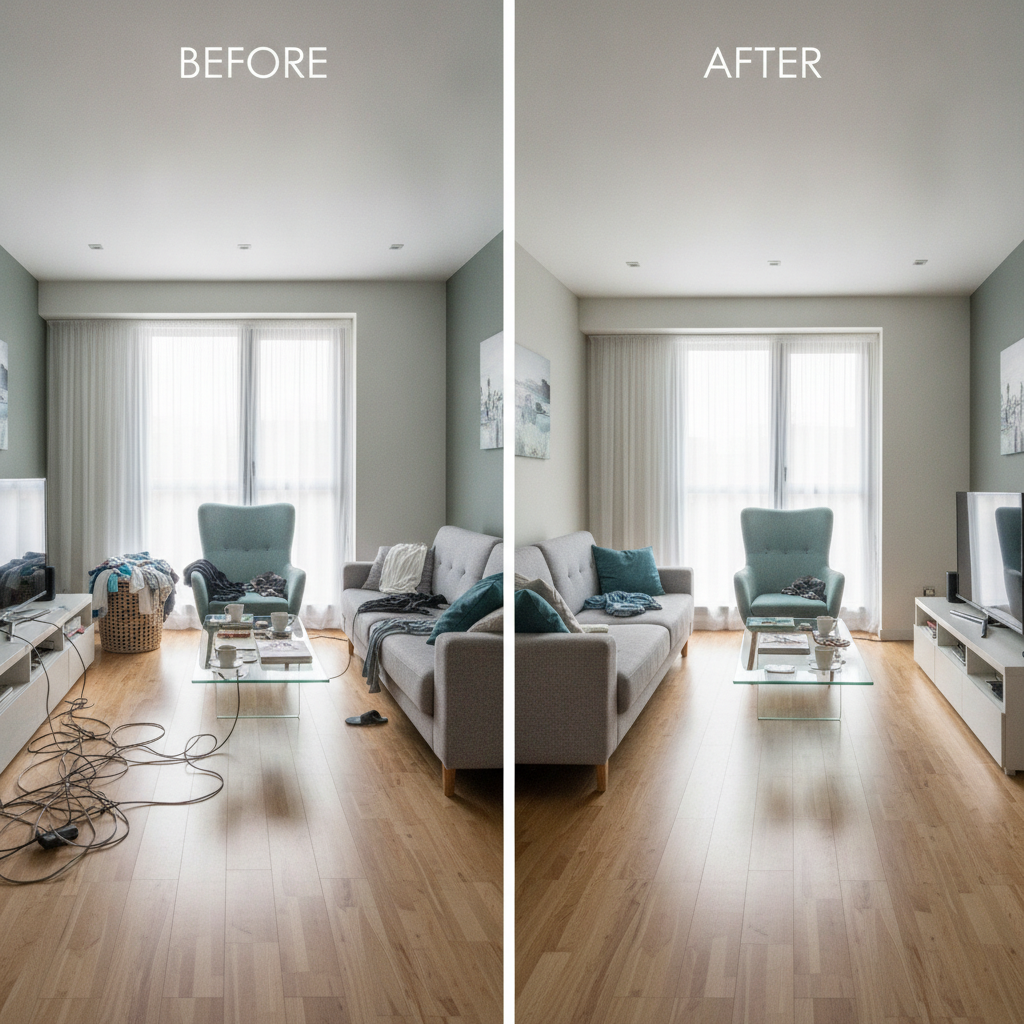
Beach clutter, room mess, product tags, wedding photobombers, crowded landmarks and portrait distractions — each one erased with the background rebuilt behind it




How the AI Object Remover Works
Three steps from a ruined shot to one you would actually print
Upload the Photo
Drop in the original at the highest resolution you have — JPEG, PNG or HEIC straight off a phone is fine. Feed it the full-size file rather than a screenshot or a messaging-app copy, because the model rebuilds the erased area from the texture it can see around it, and compressed uploads give it less to work with. One photo at a time, no account needed to make your first attempt.
Say What Should Go
Pick the preset that matches the job — unwanted objects, background people, product cleanup, room declutter, emptying a street, or portrait retouching — then name the specific thing in the details box. "The red car on the left" or "the person in the blue jacket" works far better than "the stuff in the background", because a precise reference tells the AI object remover exactly where the boundary sits and what to leave alone.
Generate and Download
Your cleaned photo arrives in roughly twenty seconds at up to 4K, watermark-free and cleared for commercial use. Zoom into the patched area before you ship it — edges against a repeating pattern are the hardest case and occasionally need a second pass. If something came back wrong, describe the object more specifically and run it again; each attempt reinterprets the scene rather than repeating the last result.
Why This AI Object Remover Beats a Clone Stamp
Six reasons the patched area holds up when you zoom in
It Rebuilds, It Does Not Smudge
A clone stamp copies pixels from somewhere else in the frame, which is why removals done that way show repeated texture and a soft bruise where the object sat. This tool generates new content that continues the scene — the grain of the sand, the run of the floorboards, the line of the skirting board, the gradient of the sky. The difference is invisible in a thumbnail and obvious at 100%, which is exactly where anyone judging your photo will look.
Perspective and Lines Survive
The failure that gives away a bad edit is a straight line that stops being straight. Erase a car parked against a building and the mortar courses, window ledges, kerb and road markings all have to continue through the gap at the right angle. Because the model understands the scene rather than the pixels alone, architectural edges, tiling, floorboards and horizons carry on through the patched region instead of bending or dissolving at the seam.
Six Jobs, Six Presets
Unwanted objects for bins, cables, poles and litter. People and photobombers for the strangers behind your subject. Clean product shot for tags, stands, cords and props before a listing goes live. Declutter a room for real estate and interiors. Empty the street for landmarks you could not photograph without a crowd. Portrait cleanup for lanyards, stray hairs and dust spots. Each carries its own instructions about what to protect, not just what to delete.
Your Subject Stays Untouched
Every preset is written to protect the thing you actually care about. The portrait preset explicitly forbids smoothing skin, slimming faces or reshaping features, so a cleanup does not quietly turn into a beauty filter. The product preset holds shape, material and color constant so the listing still matches what ships. Removing a distraction should change one part of the photo and leave the rest exactly as your camera recorded it.
4K Output, No Watermark
Cleaned photos export at up to 4K with no watermark and full commercial rights — which matters more here than for most tools, because the whole point is a repair that survives inspection. A downscaled export hides the patch by hiding everything, and then falls apart the moment the image is used at full size on a listing page, a printed flyer or a property brochure. You get the resolution you uploaded with.
Free to Start, $9.98 to Scale
Clean up your first photos free with no credit card, on your own images, before deciding whether the results are good enough for your work. Paid plans start at $9.98 when the volume arrives — a property shoot of forty rooms, a product catalogue refresh, a holiday album where every good shot has a stranger in it. That is well under one hour of a retoucher’s time, with no per-image fee stacking up behind it.
Frequently Asked Questions
Common questions about using an AI object remover
Get the Photo You Meant to Take
Erase bins, cables, photobombers, parked cars and clutter — and get back a background that looks like it was never interrupted. 4K, watermark-free, powered by Nano Banana Pro. Free to start, plans from $9.98.
Erase Anything From a Photo With an AI Object Remover
Almost every photo library contains the same quiet tragedy: a shot that is perfect except for one thing. A wheelie bin at the edge of the frame. A stranger walking through the background at the exact moment the shutter fired. A cable snaking across an otherwise clean worktop. A car parked in front of the building you drove two hours to photograph. The composition is right, the light is right, and one object you had no control over is the reason the picture never gets used. An AI object remover exists for precisely that photo, and it turns what used to be a specialist retouching job into a sentence and twenty seconds.
The thing worth understanding is that removal is not really about removal. Any tool can delete a region of pixels — the difficulty has always been filling the hole convincingly. Traditional approaches copy from elsewhere in the same image, which is why clone-stamped edits betray themselves with repeated texture, a suspicious blur, and lines that quietly stop being straight where the patch begins. This AI object remover generates genuinely new content for the covered area, informed by the lighting direction, texture, grain, perspective and depth of field of everything around it. Brick courses continue at the correct angle. Sand keeps its texture. A wooden floor carries its grain through the gap where a laundry basket used to be.
Six presets cover the jobs people bring most often. Unwanted objects handles the general case — bins, poles, signage, litter, cables. People and photobombers keeps your subject exactly as shot while clearing the strangers behind them. Clean product shot strips price tags, stands, cords and props before a listing goes live. Declutter a room rebuilds floors and surfaces under the mess for real estate and interiors work. Empty the street clears tourists, traffic and scaffolding from landmarks. Portrait cleanup removes lanyards, stray hairs and dust spots while explicitly refusing to smooth skin or reshape a face, because a cleanup should not become a beauty filter without you asking.
Real Estate, Product Listings, Travel and Family Photos
The people who reach for an AI object remover daily are the ones for whom a distraction costs money. Estate agents whose room photos need to look spacious rather than lived in. Sellers on marketplaces where a stray price sticker or a hand in the frame makes a listing look amateur. Travel photographers who cannot wait three hours for a plaza to empty. Wedding and event shooters delivering albums where one guest wandered into the aisle shot. Parents with a beach photo of their kids that happens to include somebody else’s picnic. In each case the alternative was never a better photograph — it was paying a retoucher, or simply not using the image.
Getting a clean result comes down to how you describe the target. Name it the way you would point it out to a person standing next to you: the red car on the left, the man in the blue jacket, the sign above the door, the cable running along the skirting board. Specificity draws the boundary. Upload the largest original file you have rather than a screenshot, since the model rebuilds from the texture it can actually see. Work outward-in on busy scenes, taking one prominent object per pass instead of asking for everything at once. And always zoom to full size on the repaired area before you publish — objects sitting against fine repeating patterns like tiled brick or a bookshelf are the hardest case and are the ones most likely to want a second attempt.
One boundary is worth stating plainly, because the tool is capable enough to make it matter. Use the AI object remover on images you own or have permission to edit. Clearing your own watermark, tidying your own product shot or removing a bystander from your own holiday photo is exactly what it is for. Stripping a photographer’s or stock library’s watermark from a licensed image is copyright infringement whatever software performs it, and altering photographs used as evidence, journalism or documentation changes the factual record rather than the composition. Within those limits everything you produce is yours: up to 4K, watermark-free, cleared for commercial use, free to start with no credit card, and plans from $9.98 when a whole shoot needs cleaning.
Try the AI object remover free today. Erase unwanted objects, people and clutter from any photo and get the background rebuilt seamlessly at up to 4K. No credit card required to start. Paid plans from $9.98.